You can check your UAE work permit status online for free on MOHRE’s Inquiry services page. Choose Electronic work permit information, type the transaction number your employer or PRO gave you, enter the verification code and search. No login is needed. If you have UAE PASS, the MOHRE app shows the same record without a transaction number.
A work permit is different from a UAE residence visa, so the correct status-check service depends on what you want to verify. This guide explains where and how to check UAE work permit status online, what the different results mean, and what to do if your application gets stuck.
Official UAE Work Permit Status Check
Authority: Ministry of Human Resources and Emiratisation (MOHRE) For: UAE private-sector work permits and related labour services For residence visa status: ICP or GDRFA Dubai Free zone jobs: your free zone authority, not MOHRE
Latest Updates (October 2026)
Checked 19 October 2026: the work permit services are still live on MOHRE’s inquiry list, including Electronic Work Permit Information, Application Status, Print Electronic Work Permit, Enquiry for Job Offer, View Approved Contract and Transaction Status in Immigration.
Different names, same services: the older service list calls the initial approval check “Pre Approval For Work Permit”, while the newer inquiry screen shows “Status of initial approval notification for work permit”. Both point to the same stage.
Penalties are higher since 31 August 2024: Federal Decree-Law No. 9 of 2024 raised fines to AED 100,000 to AED 1,000,000 for employers who use workers without proper authorisation, as Mondaq summarised.
What Is a UAE Work Permit?
A UAE work permit is MOHRE’s authorisation for a private sector employer to hire a specific worker, distinct from the residence visa that separately grants legal residency. Under Article 6 of Federal Decree Law No. 33 of 2021, it is illegal for anyone to work in the UAE without a valid work permit, and employers may not recruit or employ a worker without one either.
Which Authority Handles What
Different documents have different issuing authorities, and checking the wrong one wastes time.
Document
Main Purpose
Main Authority
Work permit
Legal authorisation to work
MOHRE
Residence visa
Legal residence in the UAE
ICP or GDRFA Dubai
Entry permit
Entry for the relevant purpose
ICP or GDRFA Dubai
As a general rule, the rest of the UAE routes through MOHRE and ICP, while Dubai specifically routes through GDRFA for residence documents.
Work Permit vs Residence Visa: What’s the Difference?
Work Permit
Residence Visa
Authority
MOHRE
ICP (other emirates) or GDRFA (Dubai)
Covers
Employment relationship, labour rights
Legal right to reside in the UAE
Checked via
MOHRE enquiry services
ICP Smart Services or GDRFA portal
What Happens After Initial Work Permit Approval?
What Is Initial Work Permit Approval?
The employer submits the required job offer and supporting documents as part of the initial work permit application, which MOHRE reviews to confirm everything is complete. This approval is what allows the worker to enter the UAE, it is not itself permission to begin working.
What Happens Once the Worker Arrives?
Upon arrival, both the employer and worker sign the job offer, which is then officially registered with MOHRE as a legally binding employment contract. This registration must happen within 14 days of the worker’s arrival, or from the date of a status change if the worker is already in the UAE. Once that is done, a labour contract check on MOHRE confirms the registration went through.
Which Stage Is Your Work Permit At?
Most “is my work permit approved?” questions are really about the stage. Each stage has its own check, and looking in the wrong place is the most common reason people see “no record found”.
Stage
What is happening
Where to check
1. Quota
The company needs quota approval before it can hire
E Quota Status on MOHRE (employer side)
2. Job offer and initial approval
You sign the offer and MOHRE reviews the initial work permit application
Enquiry for Job Offer, then Pre Approval for Work Permit
3. Entry permit
Immigration issues the entry or status change permit
Transaction Status in Immigration on MOHRE, or GDRFA Dubai / ICP
4. Medical, Emirates ID and visa
You complete the medical test and biometrics
GDRFA Dubai or ICP
5. Contract and work permit
The contract is registered and the electronic work permit is issued
View Approved Contract and Electronic Work Permit Information
Stuck at stage one? The quota approval check explains how employers read the E Quota result.
How to Check Your Work Permit Status via MOHRE
Checking your work permit status through MOHRE is the most direct route, since MOHRE issues the permit itself. You can do it on MOHRE’s public inquiry portal without logging in. All you need is the transaction number, which your employer or PRO can give you.
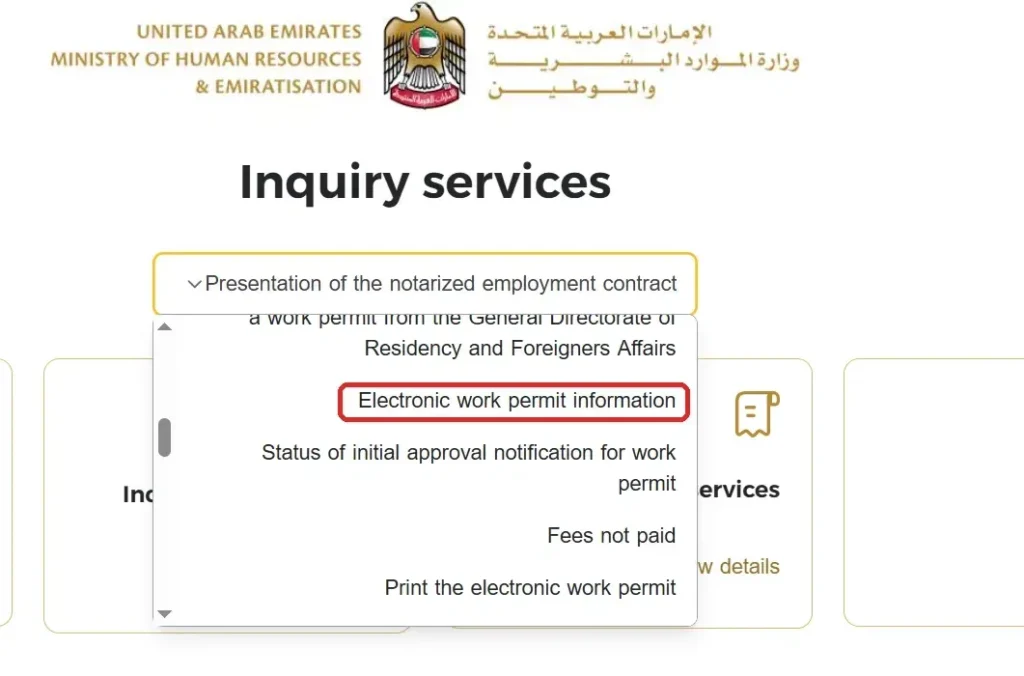
Step 1: Go to inquiry.mohre.gov.ae and open the service list. Select Electronic work permit information.
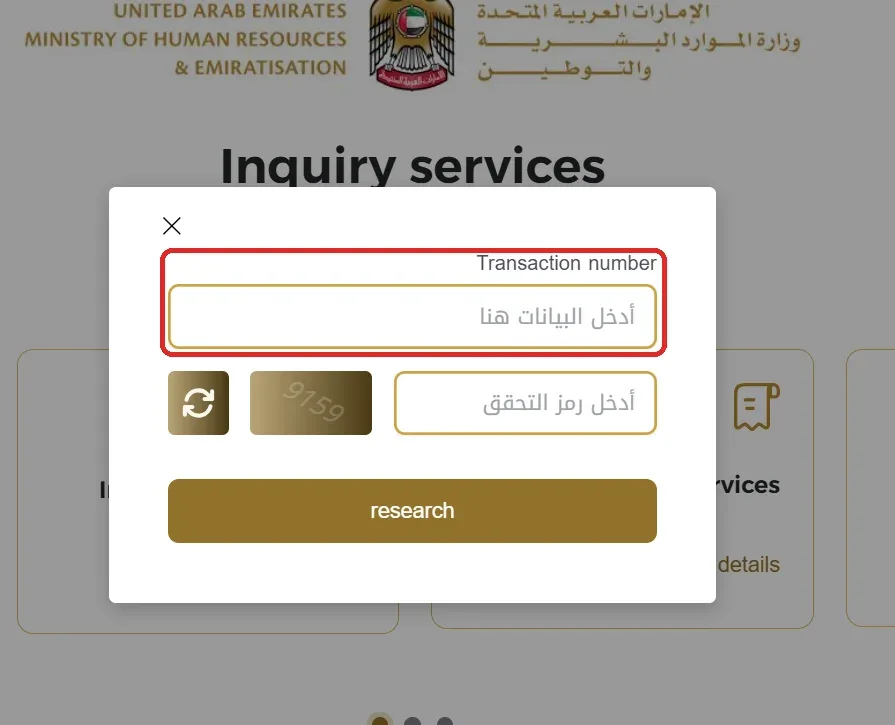
Step 2: Enter your transaction number and the verification code shown, then click search.
Step 3: Review the work permit details that appear, such as the company name, job title and permit status.
How to Check Pre-Approval Status Specifically
On the inquiry page, choose “Status of initial approval notification for work permit” (listed as “Pre Approval For Work Permit” on the older service list) and enter the transaction number of the application. If you only have your offer letter, ask the company PRO for this number, because the initial approval is filed by the employer, not by you.
How to Print Your Electronic Work Permit
On inquiry.mohre.gov.ae, select “Print the electronic work permit”, enter the required details, and download or print the document directly. This is a distinct service from a simple status check, useful when you need the actual document rather than just a confirmation that your permit is active.
How to Check Work Permit Renewal Status
A renewal is a new transaction with its own number. Use Application Status with that number to see where it is, then Electronic Work Permit Information once it is approved to confirm the new details.
How to Check Work Permit Status via the MOHRE App
Available on iOS and Android, the MOHRE app lets you track documents, approvals, and renewals from your phone after logging in with UAE Pass.
Dubai Work Permit Check: Mainland or Free Zone?
Dubai mainland company: your work permit is a MOHRE permit. Check it on MOHRE exactly as above. Dubai residence and entry permits are on GDRFA Dubai.
Free zone company (such as JAFZA, DMCC or DIFC): the free zone authority issues your employment permit and handles your visa. MOHRE will usually show no record, so check on your free zone portal or ask the free zone HR team.
Domestic workers: MOHRE handles these too, through the separate Domestic Worker Enquiry service.
Types of UAE Work Permits
MOHRE issues 12 types of work permit, according to the UAE Government portal. Knowing yours helps you read the result.
Recruiting a worker from outside the UAE
Transferring a foreign worker between establishments
Work permit for a resident on family sponsorship
Temporary work permit
One mission work permit
Part time work permit
Juvenile permit for ages 15 to 18
Student training and employment permit
UAE and GCC national permit
Golden visa holder permit
National trainee permit
Freelance permit
Private teachers have their own Private Teacher Work Permit service on the MOHRE inquiry list.
Work Permit vs UAE Residence Visa Status
If you want to check your residence visa rather than your employment permit, that’s a separate record handled by ICP (Abu Dhabi, Sharjah, Ajman, Ras Al Khaimah, Fujairah, and Umm Al Quwain) or GDRFA (Dubai specifically), not MOHRE. A visa status check on ICP or GDRFA covers that side.
What Does Transaction Under Process Mean on MOHRE?
“Transaction under process” is a normal, active status, not an error. It simply means your application is still being reviewed. If the status persists for an unusually long time without any update, it’s worth contacting MOHRE directly rather than assuming the worst.
How Has Processing Improved in Recent Years?
Under the UAE’s Work Bundle initiative, confirmed directly on the UAE Government’s official portal, several employment and residency procedures have been consolidated into a single integrated platform.
The number of required in-person visits has dropped from 7 to 2, and the number of steps from 15 to 5, cutting the overall processing timeline from 30 working days down to 5 working days. Actual processing time for a specific application can still vary depending on the documents, employer, and service type involved.
What Do the Different MOHRE Status Labels Mean?
The exact wording changes from service to service, but results usually fall into these groups:
What you see
What it usually means
What to do
No record found
Wrong number, a typo, or the permit is not a MOHRE permit (free zone)
Recheck the number and confirm the employer is a mainland company
Under process
MOHRE is still reviewing the transaction
Wait, then ask the PRO if nothing changes for several working days
Approved or active
The permit or approval is in place
Move to the next stage, such as entry permit or medical
Rejected or returned
Something is missing or failed a check
Ask the employer which document or condition caused it
Cancelled or expired
The permit is no longer valid
Check whether a new or renewed permit has been filed
If the result still does not make sense, ask your employer’s PRO what it means for your application, or contact MOHRE.
Is MOHRE the Same as MOL?
Yes. MOL, the Ministry of Labour, was the ministry’s former name. MOHRE is the current name for the same authority, and older documents or advice referencing MOL apply the same way today.
What to Do If Your Work Permit Status Does Not Update
If your status hasn’t moved and you’re concerned, work through this in order.
Recheck the information you entered, an incorrect application, passport, or reference number can prevent the system from finding the correct record.
Check whether the application has any missing documents or requirements, often visible as a note against the transaction.
Ask your employer or PRO to verify the application from their side, since they can sometimes see details you can’t.
Check whether the establishment itself has any issue affecting the application, such as quota or compliance matters, since this sits with the employer to resolve.
Contact MOHRE through its official support channels if the status remains unresolved.
Visit an authorised MOHRE service centre in person if the issue persists.
Specialised category permits, which require additional ministry clearance, can reasonably take longer without it being a cause for concern.
Article 6 of Federal Decree-Law No. 33 of 2021 bars anyone from working in the UAE without a valid work permit, and bars employers from hiring without one. Since 31 August 2024, Decree-Law No. 9 of 2024 sets fines of AED 100,000 to AED 1,000,000 for employers who use workers without the right authorisation or use permits for a different purpose.
For you as a worker, the practical risk is a record that complicates your next visa or job. So if your status shows cancelled or expired while you are still working, raise it with HR the same day.
Frequently Asked Questions
How to Check UAE Work Permit Status Online?
Through the Electronic work permit information service at inquiry.mohre.gov.ae using your transaction number, or through the MOHRE app with UAE Pass.
Can I check my UAE work permit with my passport number?
On MOHRE’s public inquiry portal, the Electronic work permit information service asks for your transaction number, not your passport number. If you don’t have it, ask your employer or PRO, or log in to the MOHRE app with UAE Pass.
Is a work permit the same as a residence visa in the UAE?
No. A work permit is MOHRE’s employment authorisation, while a residence visa is your legal right to reside in the UAE, checked separately through ICP or GDRFA.
What does “transaction under process” mean on MOHRE?
It means your application is actively being processed. This is a normal, active status rather than an error, though it’s worth contacting MOHRE if it persists for an unusually long time.
How long does a UAE work permit take to process?
Under the Work Bundle initiative, confirmed by the UAE Government’s official portal, in-person visits dropped from 7 to 2 and the overall process was reduced from 30 working days to 5. Actual timelines can still vary by application and service type.
What should I do if my work permit status does not update?
Recheck the details you entered, look for a status note about missing documents, ask your employer’s PRO to check from their side, and contact MOHRE directly if it remains unresolved.
Is MOHRE the same as MOL?
Yes. MOL was the ministry’s former name. MOHRE is the current name for the same authority.
Can I print my UAE electronic work permit online?
Yes. On inquiry.mohre.gov.ae, select “Print the electronic work permit”. It’s a separate service from the status check.
How do I check if my work permit is approved?
Check the initial approval with the Pre Approval for Work Permit service, then the final permit with Electronic Work Permit Information once you are in the UAE. Both use the transaction number from your employer.
How do I check my Dubai work permit status?
If you work for a Dubai mainland company, use MOHRE in the same way as any other emirate. If you work in a Dubai free zone, check with that free zone authority, because it issues your permit instead of MOHRE.
Can I check my work permit without a transaction number?
Yes, by logging in to the MOHRE app or website with UAE PASS, which shows the records linked to your Emirates ID. Without UAE PASS, ask your employer or PRO for the number.
Why does MOHRE show no record for my work permit?
Usually the number has a typo, the transaction is too new, or your employer is in a free zone, where MOHRE does not issue the permit.
Anees is a UAE-based content creator, writer, and SEO professional with over 12 years of experience. Since 2014, he has published research-backed guides on UAE visas, labour laws, jobs, traffic fines, and government services, all verified against official sources. He is certified in SEO by HubSpot Academy and Digital Marketing by Google Digital Garage.
12+ Years ExperienceHubSpot Academy — SEOGoogle Digital Garage
Disclaimer: This information is for general guidance only, based on publicly available UAE laws and regulations. It does not constitute legal advice. Always verify with official UAE government sources or a qualified legal professional.


Your email will not be published. Comments are reviewed before appearing.