To check your UAE labour contract online, use the MOHRE View Approved Contract service at inquiry.mohre.gov.ae. With your transaction number, passport number and date of birth, you can check it without logging in. If you have UAE Pass, you can also access it through the MOHRE eServices portal or app. The check confirms whether your contract is officially registered and matches your agreed salary, job title, and employer details.
Most people only check when something feels off. A salary that doesn’t match. A job title that’s wrong. A new offer that seems too good to be true.
The smartest time to do a UAE labour contract check online is before any of that happens. Right after you sign is the most important moment. And if you’re still at the offer stage, you can verify your MOHRE job offer letter using the MB transaction number your employer provides, through MOHRE’s separate Job Offer Letter Inquiry service.
This guide covers every official way to check, download, and verify your contract, what to do if your free zone employer isn’t on MOHRE, and how to spot a forged one.
What Is a UAE Labour Contract and Why Does It Actually Matter?
So what is a MOHRE contract, exactly? It’s the legal agreement between you and your employer. It gets registered with the Ministry of Human Resources and Emiratisation (MOHRE).
Some people call it an employment contract. Others call it a labour contract. Both terms point to the same registered document.
It’s not just paperwork. It’s the document that decides:
Your salary
Your job title
Your working hours
Your leave entitlement
How your gratuity gets calculated
Generally, disputes are assessed based on the registered employment contract and official MOHRE records, not verbal promises or offer letters. That’s the version that carries the most weight.
This is governed by Federal Decree-Law No. 33 of 2021, the law that replaced the old Federal Law No. 8 of 1980. It took effect on 2 February 2022 and changed how contract types work, as explained below.
What Your Labour Contract Must Legally Contain?
When you check your contract online, use this as your checklist. By law, every UAE labour contract must clearly state:
Employer and employee details, including job title and description
Contract start date and duration
Basic salary and allowances, in AED
Working hours and weekly days off
Probation period, capped at a maximum of 6 months
Notice period, as agreed in the contract (minimum 30 days, maximum 90 days)
Workplace location and the work model (full time, part time, temporary, flexible, remote, or job sharing)
If your registered contract is missing any of these, or shows a probation period longer than 6 months, it may need clarification from HR, as some details can vary by contract type or formatting.
Limited Contract vs Unlimited Contract: What Changed
Before 2022, two contract types existed in the UAE: limited (fixed term) and unlimited (open ended). That’s no longer the case.
Here’s what changed and when:
2 February 2022: Unlimited contracts abolished. All new private sector contracts must be fixed term.
September 2022: The original 3 year cap on fixed term contracts was removed under Federal Decree-Law No. 14 of 2022.
31 December 2023: Deadline for employers to convert old unlimited contracts still on their books.
Today, a fixed term contract can run for any agreed length two years, five years, or longer as long as it states a definite end date or renewal term.
If your old paperwork still says “unlimited,” check your current MOHRE registered contract. It should reflect a fixed term structure by now.
Labour Contract vs Job Offer Letter
People often treat these as the same thing. They’re not.
A job offer letter is just the first step. A proposal with the basics: salary, title, start date. It’s not legally binding on its own.
Your labour contract is different. It’s the document MOHRE actually approves and stores. Once it’s registered, this is your legal employment record, not the offer letter, no matter what the offer said.
Always compare the two. If your offer letter said one salary and your registered contract shows something else, that gap needs fixing before you start work, not after.
How to Check a Job Offer Letter Online in the UAE
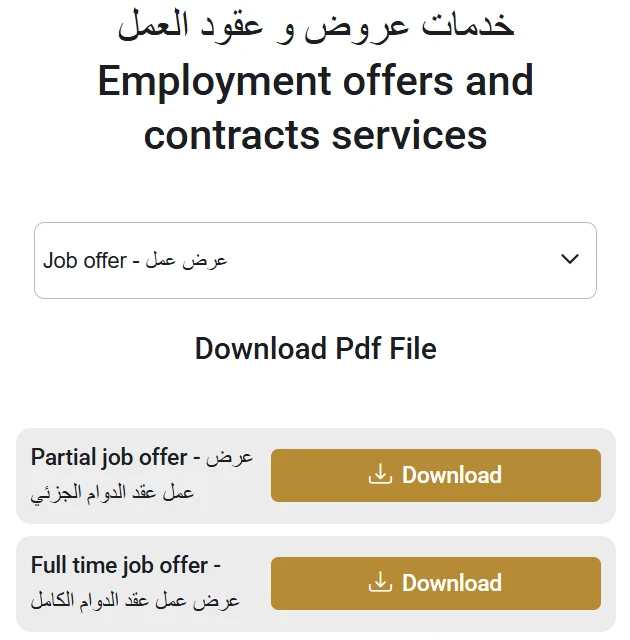
You can check a UAE job offer letter online on the MOHRE Employment offers and contracts services page, which shows the official job offer templates and lets you view the contract linked to your transaction number. The check is free and needs no login.
Open the MOHRE Employment offers and contracts services page.
Choose Job offer in the Select Service menu to see the official templates for full time, part time, flexible, temporary, remote and job sharing work.
Compare your offer letter with the matching template. A genuine MOHRE offer follows the same layout and carries a transaction number.
Under View my contract, search by transaction number with your passport number, nationality and date of birth, or search by Emirates ID.
Choose Job offer to see the official MOHRE templates you can compare your offer letter with. Source: mohre.gov.ae
The same page works for offers from mainland employers in every emirate, including Abu Dhabi and Dubai. Free zone companies issue offers through their own free zone authority, so check those on the free zone portal instead.
Treat an offer as a warning sign if the employer cannot give a transaction number, the salary differs from the template, or anyone asks you to pay for the visa or the job. UAE labour law does not allow employers or recruitment agencies to charge workers recruitment fees.
What You Need for a UAE Labour Contract Check Online?
You don’t need an account or a login to do a no login UAE labour contract check online. What you need depends on which method you use.
Method 1 (public portal, no login):
Transaction number (from your employer or labour card)
Passport number and nationality
Date of birth
Methods 2 and 3 (eServices or app, UAE Pass login):
Active UAE Pass account (requires biometrics, available once you’re in the UAE)
Emirates ID linked to your UAE Pass
Passport number, nationality, and date of birth after login
Pre arrival or no UAE Pass: Method 1 with a transaction number is your only option. Ask your employer for the transaction number from your job offer letter before you travel.
How to Check Labour Contract in UAE Online (Step by Step)
There are three ways to check your MOHRE labour contract online. Which one works for you depends on what you have available and whether you’re already in the UAE.
Pick the method that matches your situation below.
Method 1: Public Inquiry Portal (No Login Required)
This is the most accessible route. No account, no UAE Pass, no login needed. It works from anywhere, including before you arrive in the UAE.
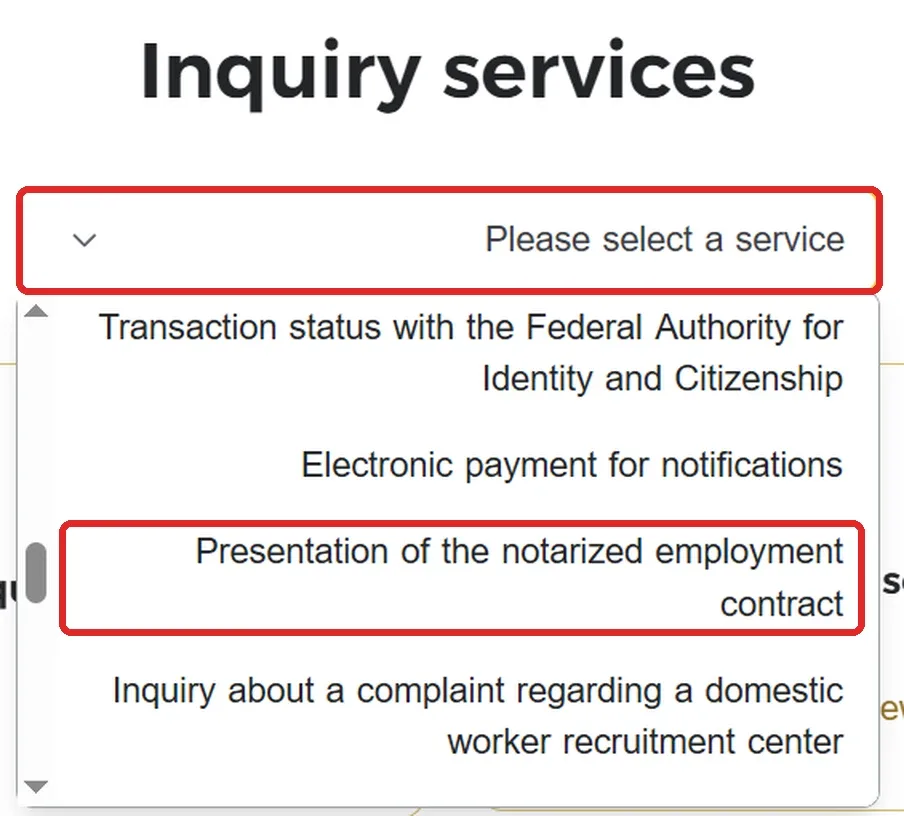
Go to inquiry.mohre.gov.ae, open the “Please select a service” dropdown and choose “Presentation of the notarized employment contract” (this is MOHRE’s View Approved Contract service).
Pick how you want to search: Search By Transaction Number or Search By EIDA No (Emirates ID).
For a transaction number search, enter your Transaction Number, Passport Number, Nationality and Date of Birth.
Enter the Captcha and click View My Contract.
Your approved contract appears on screen.
Who this works for: Anyone with a transaction number. This is the only option for people who haven’t yet arrived in the UAE or haven’t set up a UAE Pass account.
Method 2: MOHRE Website via eServices (UAE Pass Login)
If you’re already in the UAE and have a UAE Pass account, you can log into the full MOHRE eServices portal for a more complete dashboard view.
Navigate to My Contract or Labour Contract Services.
Your contract details load automatically once logged in, linked to your Emirates ID.
Who this works for: Employees already in the UAE with an active UAE Pass account linked to their Emirates ID.
Method 3: MOHRE App (UAE Pass Login Required)
Download the official MOHRE app from the App Store or Google Play.
Register or log in using UAE Pass (mandatory, not optional).
Go to My Dashboard or Services.
Tap My Contract.
Enter your passport number, nationality, and date of birth.
Submit, and your approved contract will load on screen.
Who this works for: Employees in the UAE with UAE Pass set up. Not accessible before completing UAE biometrics and UAE Pass registration.
Which Method Should You Use?
Whichever method you pick, a UAE labour contract check online takes only a few minutes.
Situation
Best Method
Haven’t arrived in UAE yet
Method 1 (public portal, transaction number)
In UAE, no UAE Pass yet
Method 1 (public portal, transaction number)
In UAE, have UAE Pass
Method 2 or 3 (eServices or app)
Quick check, have transaction number
Method 1 (fastest, no login)
How to Check Your MOHRE Labour Contract by Passport Number?
The public inquiry portal (Method 1) lets you search by transaction number (with your passport number, nationality and date of birth) or by Emirates ID, without logging in. Passport number alone will not return a contract on any MOHRE channel.
If your employer hasn’t given you a transaction number yet, ask for it directly. It appears on your job offer letter (as an MB number) or labour card.
For pre arrival checks: Your only viable option is Method 1 with the transaction number. If you haven’t arrived in the UAE yet, you won’t have UAE Pass access for Methods 2 or 3. Your employer should provide the MB transaction number on your job offer letter so you can verify the offer exists in MOHRE’s system before you travel.
How to Check a MOHRE Labour Contract Using Emirates ID?
You can also search by Emirates ID without logging in: on inquiry.mohre.gov.ae, open View my contract and choose “Search By EIDA No”. If you have your Emirates ID, you can access your approved contract through the MOHRE eServices portal or the MOHRE app, both using UAE Pass authentication linked to your Emirates ID.
Via MOHRE eServices (website):
Go to mohre.gov.ae and open eServices.
Log in using UAE Pass (linked to your Emirates ID).
Navigate to My Contract. Your contract loads automatically.
Via MOHRE app:
Open the app and log in with UAE Pass.
Go to My Dashboard and tap My Contract.
Your approved contract appears on screen, with the option to download.
No manual entry needed for either method. Your Emirates ID profile is already linked through UAE Pass.
Understanding Your MOHRE Contract Status
When you pull up your contract, the status field tells you where things stand. Here are the common statuses and what each one means:
Status
What It Means
Active
Contract is registered and currently in force
Under Process
Application submitted, MOHRE reviewing
Approved
Contract approved, ready for issuance
Expired
Contract term has ended, renewal needed
Cancelled
Contract terminated, work permit cancelled
Suspended
Contract on hold, contact MOHRE for details
If your MOHRE contract status check shows anything other than Active or Approved, contact your employer’s HR or PRO right away.
How to Download Your Labour Contract as a PDF?
Once your contract is on screen, whether on the website or the app, getting a PDF copy takes one more step.
On the website:
After your contract appears, click Print (top right or within the document view).
Choose Save as PDF instead of a physical printer.
Click Save and choose where to store it on your device.
On the app:
Open your contract under My Contract.
Tap the Share or Download icon.
Select Save to Device.
No Tasheel centre visit, no waiting on HR.
Save it the same day you sign. Under UAE Labour Law, employers cannot change your registered contract without your written consent. Any modification must go through MOHRE with both parties’ agreement. Having your own PDF means you always have a reference point if any dispute arises.
Finding Your MOHRE Labour Contract Number
Your labour contract number is sometimes called your transaction number. It shows up in two places: printed on the approved contract itself, and in your results whenever you run a View Approved Contract search.
If you don’t have it yet, you can still look up your contract. Via the app (after UAE Pass login), your contract loads linked to your account. Via the public inquiry portal, you’ll need your transaction number, passport number and date of birth. Either way, save your contract number once you find it. You’ll want it for:
Any future renewal
Filing a labour complaint, if you ever need to
Quick rechecks without reentering every detail
MOHRE, ICP, or Free Zone: Which One Actually Has Your Contract?
Using the wrong system is the most common reason people get a “no record found” result.
There are three separate systems, and each one covers something different:
MOHRE handles labour contracts for mainland, private sector employment. If your company operates outside a free zone, this is your system.
ICP (the Federal Authority for Identity, Citizenship, Customs and Port Security) manages your visa and residency status, not your labour contract. Your visa being active doesn’t confirm your labour contract is registered, and vice versa. If you also need to verify your immigration record, you can check your UAE visa status online.
Free zone authorities run their own systems entirely. If your employer is licensed under a free zone like DMCC, JAFZA, or ADGM, MOHRE will show no record at all, because your contract was never filed there in the first place.
How to Know If Your Company Is Mainland or Free Zone
Many workers don’t know which system applies to them, and it’s the first thing to confirm before searching anywhere.
Check your trade license. It will say “Mainland” (issued by DED or an emirate’s economic department) or list a specific free zone authority like DMCC, JAFZA, or DAFZA.
Look at your visa. Your UAE residence visa shows your sponsor. If it lists a free zone company, your contract is with that free zone, not MOHRE.
Check your offer letter header. It usually shows the company’s registered address and licensing authority.
Ask HR directly. Simply ask: “Is the company mainland or free zone licensed?” Any HR team will know.
If you’re still unsure, call MOHRE on 600590000 and give them your employer’s company name. They can confirm whether the company is in their system.
How to Check a Free Zone Labour Contract
Each free zone manages employment contracts through its own portal, separate from MOHRE.
Free Zone
Where Contracts Are Managed
DMCC (Dubai Multi Commodities Centre)
DMCC member portal, or request via HR
JAFZA (Jebel Ali Free Zone)
JAFZA portal, or through your company’s PRO
ADGM (Abu Dhabi Global Market)
ADGM employer portal
DDA (Dubai Development Authority, formerly TECOM)
Internal company HR portal
DAFZA (Dubai Airport Freezone)
DAFZA Smart Services Portal
In most free zones, individual employees don’t get direct self service access the way MOHRE allows. Your company’s HR or PRO usually has to pull the contract from the free zone system on your behalf.
If you’re a free zone employee, your first step is simply asking HR for your registered contract copy, not searching MOHRE.
Worth knowing: DIFC and ADGM operate under their own separate legal frameworks, not the federal Labour Law. If you work in either, your contract terms, notice periods, and gratuity rules may differ from mainland employees.
How to Verify Your Labour Contract Is Genuine?
A registered MOHRE contract carries a verifiable reference number in MOHRE’s system. If that number doesn’t appear when you search, the contract was never officially filed, no matter how official it looks on paper.
Here’s how to confirm yours is legitimate:
Check for a MOHRE reference number. Run your View Approved Contract search. If no reference number shows up, your contract isn’t registered.
Cross check the details. Compare your physical copy against what MOHRE displays: employer name, job title, salary, contract dates, and work location should all match exactly.
Confirm the status is Active. If it shows expired, cancelled, or suspended instead, contact your employer right away.
Call MOHRE to confirm verbally if you want an extra layer of certainty. The general line is 600590000 (8am to 8pm, also available via WhatsApp). For labour specific queries, use 80084, the dedicated Labour Claims and Advisory Centre, available Monday to Saturday, 8am to 8pm, in Arabic, English, and Urdu. You can also reach MOHRE’s official contact channels for email support.
Warning Signs of a Fake or Unregistered Contract
A handful of patterns show up again and again in fraud cases, and they’re worth knowing before you sign anything:
The salary on paper doesn’t match what was discussed or promised
The employer’s name doesn’t match the name on their trade license
Nothing shows up on MOHRE 7 to 10 working days after signing
Your job title changes without you agreeing to it
The offer letter has no transaction number starting with “MB”
On that last point: every genuine MOHRE approved job offer letter carries a transaction number beginning with “MB.” You can independently verify this on the MOHRE portal using the Job Offer Letter Inquiry (Enquiry for Job Offer) service. If an employer sends you an offer letter without an MB transaction number, or if it doesn’t appear when you check it on MOHRE, treat it as a serious red flag before proceeding.
If you spot any of these, don’t start work yet. Confirm with MOHRE directly, or speak to the typing centre that processed your paperwork, before you commit.
Labour Contract Not Showing Online: Why It Happens and How to Fix It
This happens often, and it’s usually easy to fix.
If your labour contract isn’t showing online in the UAE, it usually comes down to one of these:
Wrong number type entered. Transaction number, labour card number, and Emirates ID are different fields, mixing them up returns no result.
The employer hasn’t submitted it yet. New contracts typically take 7 to 10 working days to appear after signing.
You’re searching for the wrong system. If you work for a free zone company, MOHRE simply won’t have your contract, check with your free zone authority instead.
System maintenance. MOHRE’s portal occasionally goes down for updates, try again later or use the app instead.
If you’ve ruled all of these out and still see no record after 10 working days, call MOHRE on 600590000 and ask your employer’s PRO to confirm the submission status on their end.
MOHRE Contract Not Updated: What to Do
A different problem from “not showing” is a contract that appears on MOHRE but still shows old information. Your previous salary, an old job title, or details from before a recent change.
This usually means your employer processed the update internally but hasn’t pushed it through to MOHRE’s system yet.
Here’s what to do:
Confirm with HR that the modification request was actually submitted to MOHRE, not just updated in their internal records.
Ask for the modification’s transaction number, this confirms it was filed, not just promised.
Allow the same 7 to 10 working day window for the update to reflect online.
If it still hasn’t updated after that, call MOHRE directly to check whether the modification request is stuck or was never filed.
Contract modifications, like salary changes or job title corrections, follow the same processing timeline as a brand new contract. Don’t assume a verbal confirmation from HR means MOHRE has been updated too.
Common Contract Problems and How to Fix Them
Once you’ve checked your contract, actually read it. These are the issues that come up most often.
Salary doesn’t match what was promised. Sometimes the verbal offer included housing or transport allowances that never made it into the registered basic salary. Since gratuity is calculated on basic salary, this directly affects your future payout, as our UAE gratuity calculator shows. Raise it with HR first, and ask for a corrected contract if needed.
Job title doesn’t reflect your actual work. If your contract says “Administrative Assistant” but you’re doing graphic design or logistics coordination, this can cause problems later. During visa renewals, professional certifications, or if you switch jobs. Document your actual responsibilities and request a title correction.
The contract isn’t registered at all. If several weeks have passed since you started and nothing shows on MOHRE, you’re not officially recognised as an employee in the system. This puts your gratuity and legal protections at risk. Ask for your labour card number, and follow up directly with MOHRE if your employer stalls.
Old contract type still listed. If your file still shows an unlimited contract from before the 2022 reform, ask HR whether it’s been converted. It should reflect a fixed term structure today.
Wrong Details in Your UAE Labour Contract: How to Fix Them
If you’ve found an actual mismatch, salary, job title, dates, or anything else that doesn’t match what was agreed, the fix is the same regardless of which detail is wrong:
Take a screenshot or save the PDF of what currently shows on MOHRE, this is your evidence of the error.
Raise it with HR in writing, not just a verbal conversation, so there’s a record of when you flagged it.
Ask HR to submit a contract modification request through MOHRE with the corrected detail.
Re check your contract online after 7 to 10 working days to confirm the correction actually went through.
Don’t accept a verbal promise that “it’ll be fixed.” MOHRE only recognises what’s in its system, so the correction isn’t real until it shows up there.
Employer Did Not Give Contract Copy
You’re legally entitled to a copy of your contract. If your employer is refusing, you don’t have to wait on them.
Your contract is registered with MOHRE the moment it’s approved. You can access it independently through:
Method 1 (public portal): Use inquiry.mohre.gov.ae with your transaction number. No employer involvement needed.
MOHRE app + UAE Pass: Log in and your contract loads automatically.
Tasheel centre: Visit in person with your passport and Emirates ID. Staff can retrieve and print it on your behalf.
Your employer has no way to block your access through any of these channels.
If your contract isn’t on MOHRE at all, not withheld, but genuinely missing that’s a registration issue, not a copy issue. It falls under the “not registered at all” problem above.
If your employer won’t fix a confirmed error, or you’re facing unpaid salary, gratuity, or unfair dismissal, a formal MOHRE labour complaint is the next step. Our guide on how to file a MOHRE complaint in the UAE covers that full process.
If you are dealing with an absconding report or want to check whether an absconding case has been filed against you, see our guide to UAE absconding rules and status check.
How to Renew Your UAE Labour Contract Online?
Your contract doesn’t renew itself. Before it expires, your employer needs to initiate the renewal through MOHRE, the same system used for the original registration.
Here’s how the process works:
Your employer submits a renewal request through MOHRE’s website or app, before the current contract’s end date.
MOHRE processes the renewal, this typically completes within two working days once submitted correctly.
Once approved, the updated contract becomes available to view and download through the same View Approved Contract process covered earlier.
As an employee, you can’t personally trigger a renewal. Only the employer or an authorised company representative can submit one. What you can do: check your contract’s expiry date on MOHRE in advance and remind your employer well before it approaches. Leaving it to the last moment risks a gap between the old contract expiring and the new one being approved.
How Long Does It Take for a New Contract to Appear Online?
Most new labour contracts show up on MOHRE within 7 to 10 working days of signing, assuming your employer submits it promptly.
Approval itself, once submitted correctly, is usually completed within two working days. The delay is almost always on the submission side, not MOHRE’s processing.
If it’s been longer than 10 working days with no record, that’s your signal to follow up rather than keep waiting.
Conclusion
A UAE labour contract check online is one of the fastest checks you can run, and one of the most overlooked. Two minutes on MOHRE’s View Approved Contract page tells you whether your contract is real, whether it matches what you agreed to, and whether your employer has actually done their part.
The pattern worth remembering: MOHRE covers mainland contracts, your free zone authority covers everything else. Your registered contract, not your offer letter, is what counts legally if anything goes wrong.
Check it the day you sign. Download a copy for your own records. And if something doesn’t match, raise it before it becomes a bigger problem down the line.
Frequently Asked Questions
Can I do a UAE labour contract check online without an Emirates ID?
Use Method 1: the public inquiry portal at inquiry.mohre.gov.ae. Select View Approved Contract, enter your transaction number, passport number, and date of birth. No Emirates ID, no UAE Pass, no login needed.
What’s the difference between a labour contract and a labour card?
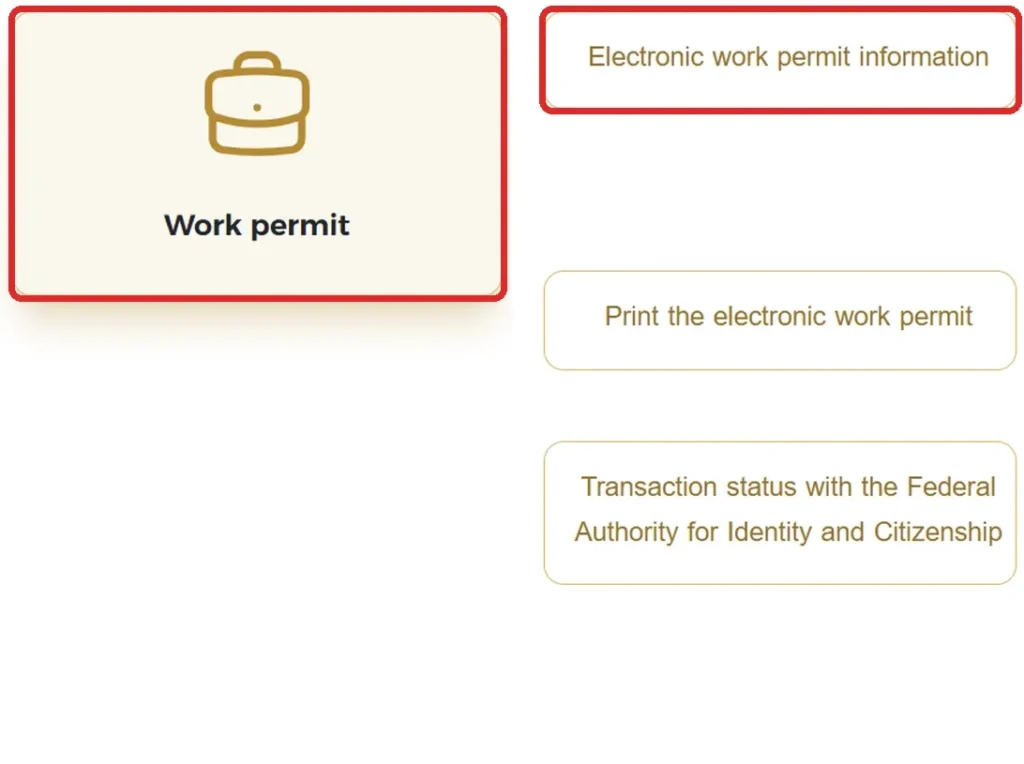
Your labour contract sets out your job terms: salary, title, hours, leave, and termination conditions. Your labour card (work permit) is the separate document that authorises you to legally work in the UAE. They’re connected but not the same document. If you also want to verify whether your work permit is active, you can check your UAE work permit status online.
Can I check my labour contract online if I work in a free zone?
Not through MOHRE. Free zone employers register contracts through their own free zone authority, such as DMCC, JAFZA, or ADGM, not MOHRE. Ask your company’s HR or PRO for your registered copy instead.
How do I check my MOHRE contract status by passport number only?
Passport number alone will not return a contract on the public inquiry portal. That portal requires a transaction number alongside your passport number, nationality and date of birth, or you can search by Emirates ID instead.
If you only have your passport details, your options are: log into the MOHRE app using an active UAE Pass account (which then lets you access your contract using passport details), or visit a Tasheel centre or MOHRE Customer Happiness Centre in person with your passport and Emirates ID and ask staff to retrieve your contract on your behalf.
What should I do if my labour contract details are wrong?
Raise it with HR first and ask for a corrected, re registered contract. If they ignore the request or refuse to fix a confirmed error, you can escalate through a formal MOHRE complaint.
Why is my labour contract not showing online in the UAE?
Usually because your employer hasn’t submitted it yet (allow 7 to 10 working days), you’re searching the wrong system as a free zone employee, or you’ve mixed up your transaction number with your Emirates ID in the search field.
What if my employer didn’t give me a contract copy?
If your employer won’t share your contract or transaction number, you are not completely without options, but you cannot look it up through the public portal using passport details alone.
Here is what you can actually do:
MOHRE app + UAE Pass: If you have an active UAE Pass account, log in and your contract loads automatically. No transaction number needed.
Tasheel or MOHRE Customer Happiness Centre: Visit in person with your passport and Emirates ID. Staff can pull and print your official contract from MOHRE’s system on your behalf.
Call 80084: The Labour Claims and Advisory Centre (Monday to Saturday, 8am to 8pm) can assist workers who are locked out of digital access and guide you on next steps, including filing a formal complaint if your employer is withholding documents.
If your contract genuinely isn’t on MOHRE at all (not just withheld, but missing from the system), that is a registration issue, and a formal MOHRE complaint is the right step.
How long is a UAE labour contract valid for?
Since the 2022 reform, all contracts are fixed term with no statutory maximum length, employer and employee agree on the duration together. There’s no more “unlimited” contract option in the private sector.
Is a UAE labour contract check online free?
Yes. Viewing, downloading, and verifying your contract through MOHRE’s website or app costs nothing.
Can I renew my own labour contract online?
No, only your employer or an authorised company representative can submit a renewal through MOHRE. You can check your contract’s expiry date in advance and remind your employer, but you can’t initiate the renewal yourself.
MOHRE Customer Care: 600590000 (8am to 8pm, also WhatsApp) for general enquiries; 80084 (Labour Claims and Advisory Centre, Monday to Saturday, 8am to 8pm) for labour complaints and legal consultations.
Anees is a UAE-based content creator, writer, and SEO professional with over 12 years of experience. Since 2014, he has published research-backed guides on UAE visas, labour laws, jobs, traffic fines, and government services, all verified against official sources. He is certified in SEO by HubSpot Academy and Digital Marketing by Google Digital Garage.
12+ Years ExperienceHubSpot Academy — SEOGoogle Digital Garage
Disclaimer: This information is for general guidance only, based on publicly available UAE laws and regulations. It does not constitute legal advice. Always verify with official UAE government sources or a qualified legal professional.


Your email will not be published. Comments are reviewed before appearing.