Based on ICP Smart Services and GDRFA Dubai official channels
A UAE visa status check tells you whether it is approved, issued, valid, or still in process, a key part of managing your UAE visa and residency status. You do it free on official portals: ICP Smart Services for every emirate except Dubai, and GDRFA for Dubai. You can run a UAE visa check by passport number once the visa is issued, or use your application number while it is still being processed.
This guide shows how to check UAE visa status online step by step, what each status means, and the small mistakes that leave people stuck.
How to Check UAE Visa Status Online? Which Portal Do You Need, ICP or GDRFA?
The right portal depends on where your visa was issued. This is the first thing to get right.
Where your visa was issued
Official portal
What you can use to search
Dubai
GDRFA Dubai
Passport number, file number, application number
Abu Dhabi, Sharjah, Ajman, RAK, Fujairah, UAQ
ICP Smart Services
Passport number, Unified ID, file number, Emirates ID
So a visa status check UAE wide really means using the correct one of these two systems. Pick the portal that matches your emirate, and the rest is quick.
One useful point: because ICP is the federal database, its File Validity service often shows Dubai issued residence visas too. Still, GDRFA remains the dedicated, authoritative portal for Dubai, and it is the one you must use for a Dubai application that is still in process. If a Dubai visa does not appear on ICP, check GDRFA.
UAE Visa Check by Passport Number: Step by Step (ICP)
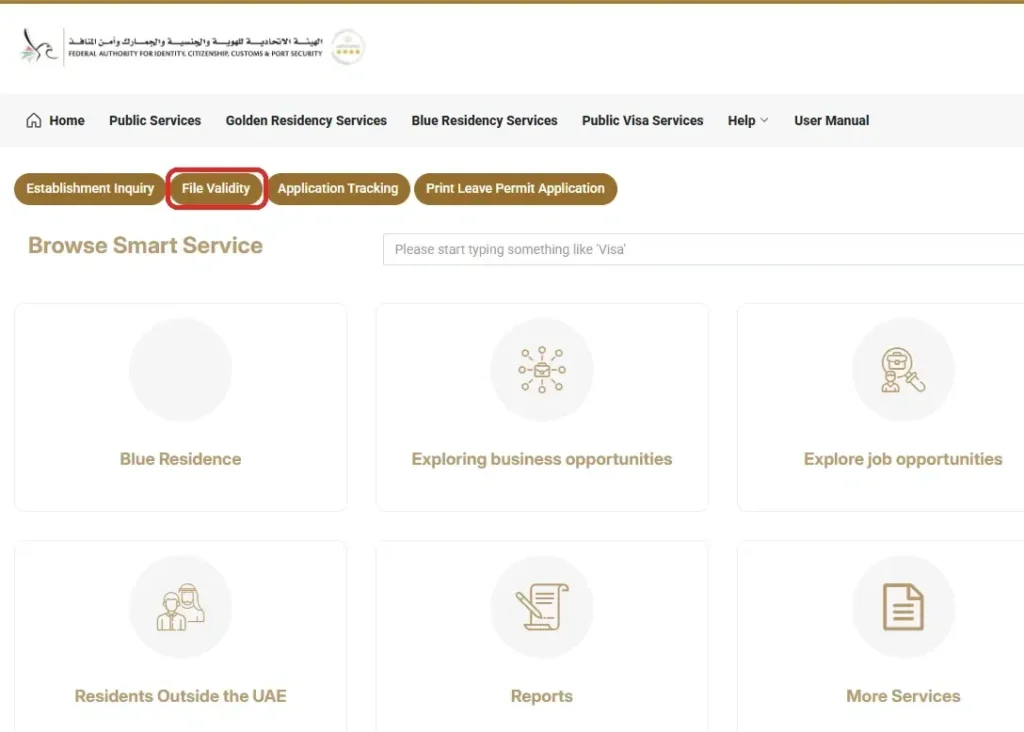
A UAE visa status check by passport number is free on ICP Smart Services through the File Validity service, with no login needed. Use it for any visa issued outside Dubai.
Click File Validity in the row of quick services under the top menu.
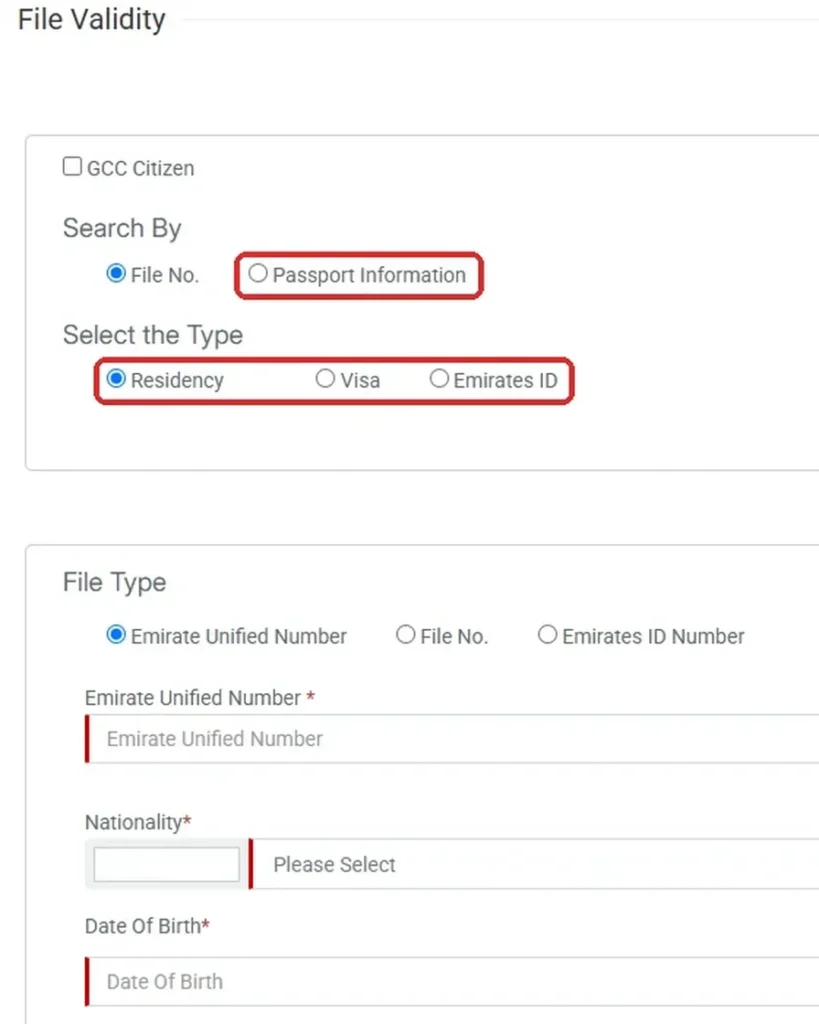
Under Search By, choose Passport Information. You can also search by File No. if you have it.
Under Select the Type, pick Residency for a residence visa, Visa for a visit visa, or Emirates ID.
Enter the details the form asks for, such as your passport number, nationality and date of birth.
Complete the verification check and click Search.
Your visa details appear, including the status, validity, and expiry date. This is the standard way to do a UAE visa check by passport number for the northern emirates and Abu Dhabi.
How to Check Dubai Visa Status (GDRFA)?
If your visa was issued in Dubai, use GDRFA Dubai instead of ICP. For a Dubai visa check by passport number only, this is the portal, and you do not need a file number.
Visit the GDRFA website and open the visa status or validity inquiry service.
Choose the passport search option.
Enter your passport number, nationality and the other details the form asks for. No login is needed.
Complete the CAPTCHA and click Submit.
Your visa details appear, including the status, validity, and expiry date.
If your application is still in process, search by your application number instead. Once the visa is issued, the file number also works. It is printed on your residence visa and available in UAE Pass. The GDRFA Dubai app runs the same checks.
How to Check UAE Visit Visa Status
You can check a UAE visit visa status with the same passport search, but you must pick the visit visa option instead of residency. The portal depends on which emirate issued the visit visa.
Visit visa issued in Dubai: use GDRFA Dubai and search by passport number or by the application number on the e visa.
Visit visa issued in any other emirate: use ICP File Validity, choose Passport Information, then select Visa as the type.
Visa bought through an airline or travel agent: the issuing emirate is printed on the e visa, so check that first.
The result shows whether the visit visa is valid, used or expired, plus the permitted stay. If you plan to stay longer, our guide to the UAE visit visa extension explains the options before the visa runs out.
Checking a Visa That Is Still Being Processed
A passport number only works once your visa is issued. While your application is still in process, the passport search may show nothing.
For an application in progress, search by your application number or reference number instead of your passport.
Dubai: use the GDRFA application status tracker.
Other emirates: use the ICP application tracking service on the smart services portal. You enter your application (request) number, and you do not need a typing centre to do this yourself.
You often get email or SMS updates as the application moves too.
Where to find your application or reference number?
On the application receipt from the typing centre or Amer centre
In the confirmation email or SMS after you applied
On the PDF or e form generated when the application was filed
Keep this number safe. Without it, an in process visa is hard to track.
UAE Visa Status Meanings: What Each One Means and What to Do?
When you run a visa status check online, you will see one of these results. Here is what each means:
A work visa has two stages. Each stage uses a different system.
At the work permit stage, MOHRE handles it. Follow these steps:
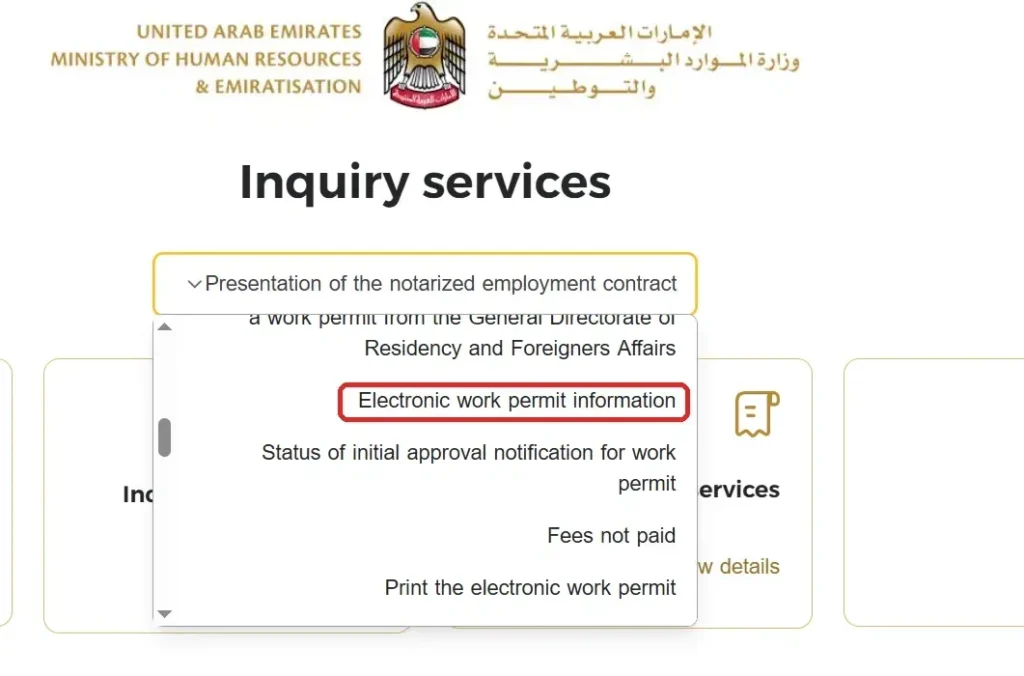
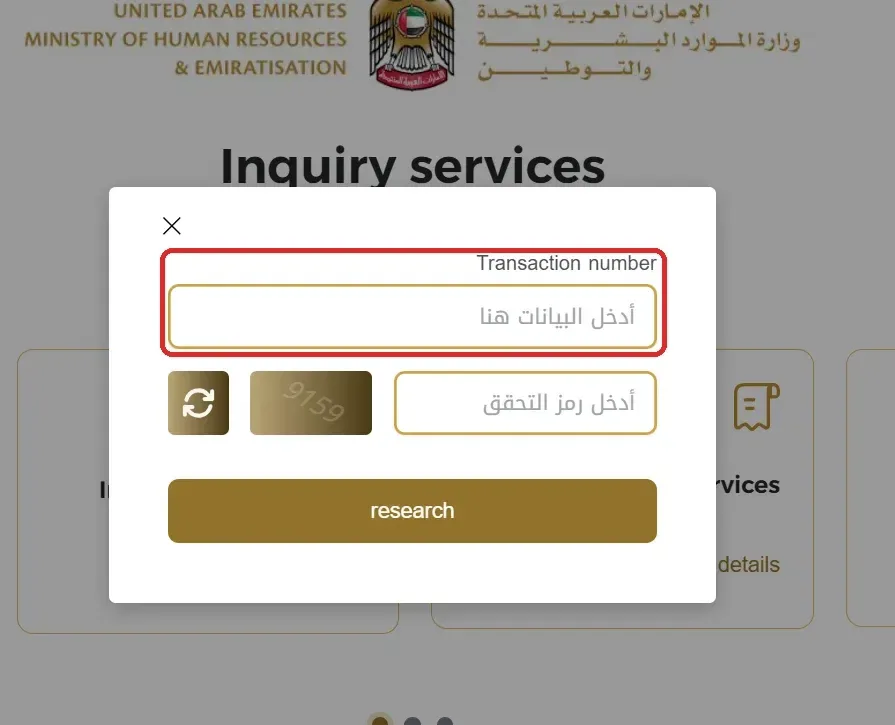
Go to MOHRE’s inquiry portal (inquiry.mohre.gov.ae).
From the list of inquiry services, select Electronic Work Permit Information.
Enter your Transaction Number, complete the CAPTCHA and click Search.
Your work permit status and details appear on screen. The transaction number is on the work permit or offer documents your employer or typing centre gave you. For the full process, see our guide on how to check UAE work permit status online.
You can also check this on the MOHRE app after logging in, or visit a MOHRE business service centre with your Emirates ID or passport.
Once the work permit clears, the residence visa stage begins. Switch to ICP for most emirates. Use GDRFA for Dubai. Follow the same steps covered earlier in this guide.
So MOHRE covers the job and work permit side, while ICP and GDRFA cover the residence visa itself. If MOHRE flags an issue with your permit, you can raise it directly with MOHRE.
Checking Visa Status for Family or Sponsored Members
You can check a sponsored family member’s visa the same way you check your own. Use their details, not yours.
Example: to check your spouse’s visa status:
Go to ICP Smart Services, or GDRFA if you sponsored the visa in Dubai
Enter their passport details as the form asks
Search
The system pulls up their file. It does not depend on your own visa status.
If their visa is still processing, use their application number instead of their passport number. Same rule as checking your own in process application.
Keep their passport and file details ready before you start. A wrong name spelling or passport number is the most common reason this search fails.
Checking Your Visa Validity and Expiry Date
Your residence visa has an expiry date, and missing it leads to fines. A quick validity check shows the expiry so you can renew in time. Our UAE residence visa renewal guide covers the next step.
Use the File Validity service on ICP, or the visa status service on GDRFA, and read the expiry date. If your visa has already lapsed, act fast. Overstay fines start at AED 50 per day once the grace period ends, and you can see what you owe with our UAE visa overstay fine check.
One more rule worth knowing: a standard residence visa is cancelled if you stay outside the UAE for more than six consecutive months. Golden Visa holders are exempt and can stay away longer as long as the visa stays valid. Some others, such as students studying abroad or people receiving medical treatment abroad, can be exempted or can apply for a return permit. Either way, check your status before long trips abroad.
Other Ways to Check: Apps, UAE Pass, and Helplines
You are not limited to the website.
ICP app and GDRFA Dubai app. Both run the same checks on mobile.
UAE Pass. Your file number and visa details sit inside UAE Pass, ready to use.
Phone. Call ICP on 600 522222. For a Dubai visa, call Amer on 800 5111 inside the UAE, or +971 4 313 9999 from abroad.
What to Do If Your Status Is Stuck on “Under Process”
“Under process” is normal at first. It means immigration is still reviewing your file.
If it does not move after a reasonable time, do this:
Recheck with the correct number (application number while in process, passport once issued).
Call ICP on 600 522222, or Amer on 800 5111 for a Dubai visa, with your application and passport details ready.
Ask your sponsor or typing centre to confirm nothing extra is needed from your side.
Use Only Official Government Portals
A clear warning. Only the official platforms, ICP Smart Services and GDRFA Dubai, can show your real UAE visa status. MOHRE covers work permits.
Many third party sites copy the look of an official checker to harvest your passport and personal details. Never enter those on an unofficial “check” site. If a page is not on a government (.gov.ae) domain, do not trust it with your data.
Conclusion
A UAE visa status check takes a couple of minutes and saves you from overstays, fines, and travel surprises. Use ICP for every emirate except Dubai, GDRFA for Dubai, your passport number once the visa is issued, and your application number while it is in process.
Check your validity before long trips and before renewals, keep your file or application number safe, and stick to the official portals only. If you also need to confirm your ID, an Emirates ID status check takes just as little time.
Frequently Asked Questions
How do I check my UAE visa status by passport number?
Use ICP Smart Services for any emirate except Dubai, or GDRFA for Dubai. Select the File Validity or visa status service, enter your passport details, and search. A visa status check by passport number works once the visa is issued.
How do I do a Dubai visa status check?
Use GDRFA Dubai. Open the visa status service and search by your passport number and the other passport details the form asks for. A file number also works once the visa is issued, or an application number while it is in process. For a Dubai visa check by passport number only, GDRFA is the correct portal.
Can I check my visa status while it is still being processed?
Yes, but not by passport number. While your application is in process, search by your application or reference number, on GDRFA for Dubai, or the ICP application tracking service for the other emirates. You can do this yourself online, no typing centre needed. The passport search works only after the visa is issued.
What does “under process” mean on my visa status?
It means immigration is still reviewing your application. This is normal. If it does not change after a reasonable time, call ICP on 600 522222, or Amer on 800 5111 for a Dubai visa.
How do I check my UAE employment visa status?
At the work permit stage, check on MOHRE’s inquiry portal under Electronic Work Permit Information, using your transaction number. Once the residence visa is issued, check the residency status and validity on ICP, or GDRFA for a Dubai visa.
Can I check the visa status of my family members?
Yes. Use the sponsored person’s passport number or file number on the right portal, the same way you check your own.
Is the UAE visa status check online free?
Yes. ICP Smart Services and GDRFA Dubai do not charge to view your visa status or validity.
Can I do a UAE visa status check from outside the country?
Yes. The ICP and GDRFA portals and apps work from anywhere. For a Dubai visa by phone from abroad, call Amer on +971 4 313 9999.
Which portal do I use, ICP or GDRFA?
GDRFA for visas issued in Dubai, and ICP Smart Services for Abu Dhabi, Sharjah, Ajman, Ras Al Khaimah, Fujairah, and Umm Al Quwain.
Official Sources & References
ICP Smart Services: visa and residency status for all emirates except Dubai
GDRFA Dubai: visa status and validity for Dubai visas
Anees is a UAE-based content creator, writer, and SEO professional with over 12 years of experience. Since 2014, he has published research-backed guides on UAE visas, labour laws, jobs, traffic fines, and government services, all verified against official sources. He is certified in SEO by HubSpot Academy and Digital Marketing by Google Digital Garage.
12+ Years ExperienceHubSpot Academy — SEOGoogle Digital Garage
Disclaimer: This information is for general guidance only, based on publicly available UAE laws and regulations. It does not constitute legal advice. Always verify with official UAE government sources or a qualified legal professional.





Your email will not be published. Comments are reviewed before appearing.