Based on the official ICP (Federal Authority for Identity, Citizenship, Customs & Port Security)
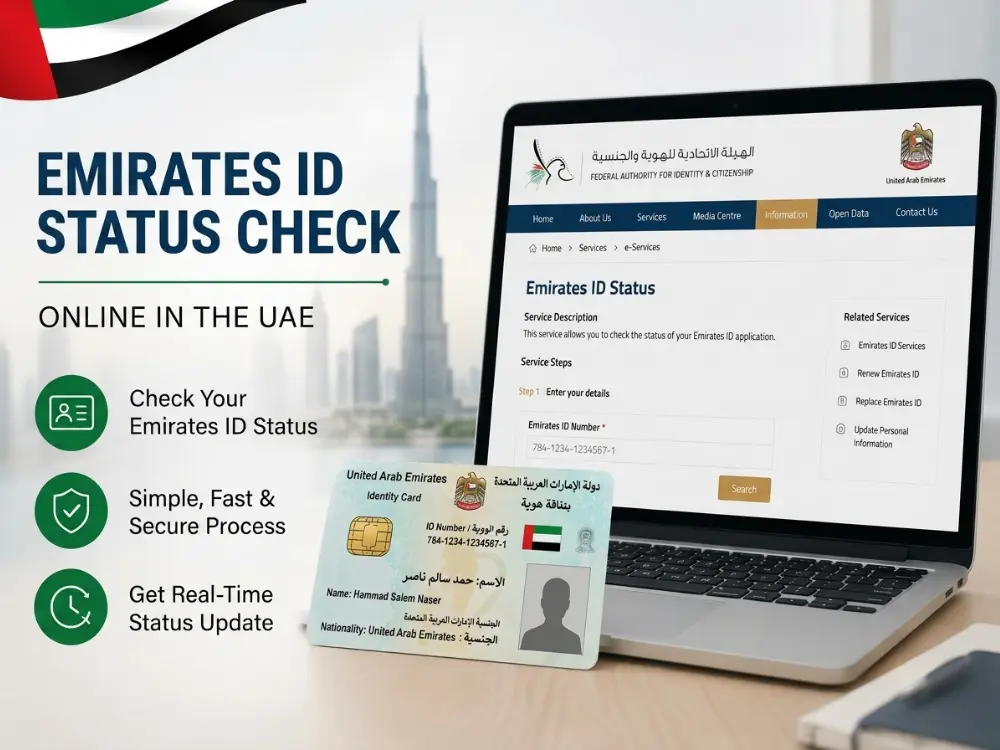
Doing an Emirates ID status check online in the UAE is quick and free. You track your Emirates ID status on the official ICP system using your PRAN (application number) for a new card, or your Emirates ID number for a renewal or replacement. The tool above takes you straight to the official page with the right number.
A quick note on naming: the authority was previously known as ICA (Identity and Citizenship Authority). It now operates as ICP, the Federal Authority for Identity, Citizenship, Customs and Port Security. If you see “ICA” in an older guide or an old bookmark, it refers to the same authority.
This guide shows every way to do an Emirates ID check, what each status means, how long it takes, and how to fix a stuck application. If you’re specifically checking your broader UAE visa status rather than just your Emirates ID, that process runs on a related but separate portal, covered in our visa status guide.
How to Check Your Emirates ID Status Online
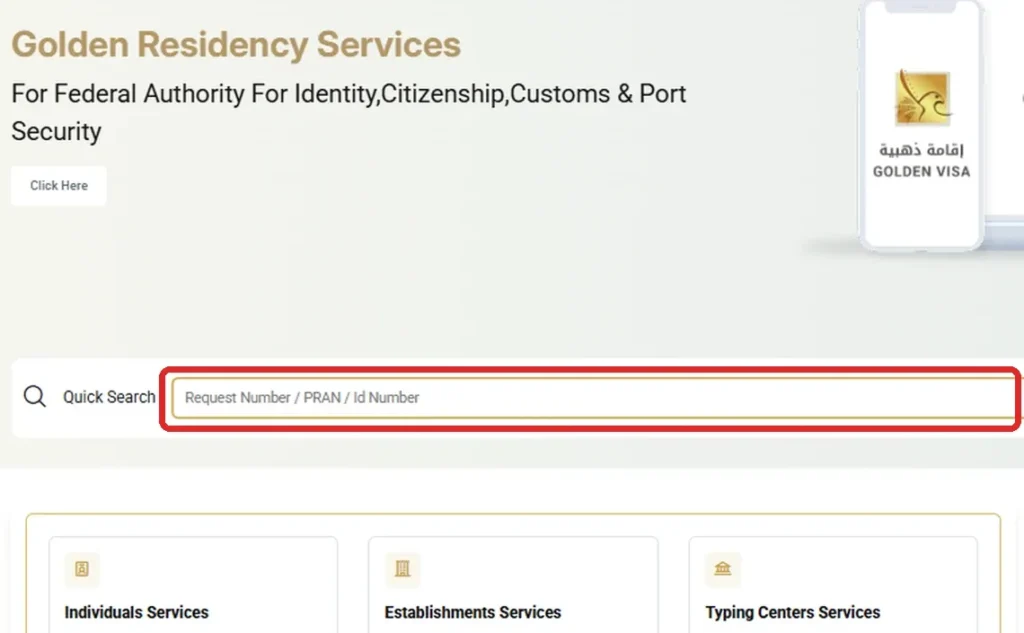
The official way to track your Emirates ID is the Quick Search box on the ICP Smart Services homepage (smartservices.icp.gov.ae). It is free, instant, and needs no login.
What you need first
For a new application: your PRAN (application number).
For a renewal or replacement: your Emirates ID number (the 15-digit number on your card, starting with 784).
Step by step
Here is how to check Emirates ID status, step by step:
In the Quick Search box at the top, enter your PRAN, request number or Emirates ID number.
Click Inquiry.
Your current status appears, along with the history of your application.
That is the fastest emirates ID status check online, and it works for new cards, renewals, and replacements.
How to Check Emirates ID Status With Passport Number
Your passport helps here, but with one important limit to understand. This is the most reliable way to check Emirates ID status with passport number when you only have your passport on hand, but which portal you use depends on which emirate issued your residence visa.
Check which emirate issued your visa first. Your Emirates ID is structurally linked to your residence visa, and the UAE splits visa records across two separate systems:
Dubai-issued visas sit with GDRFA Dubai (General Directorate of Residency and Foreigners Affairs), not ICP.
All other emirates, Abu Dhabi, Sharjah, Ajman, Umm Al Quwain, Ras Al Khaimah, and Fujairah, sit with ICP.
If you put a Dubai-issued visa’s passport details into the ICP portal, it may not flag your mistake and can simply return “No Record Found,” which understandably alarms people into thinking their visa was cancelled when it is actually fine, sitting on a different network.
For Dubai visas: Visit the official GDRFA Dubai Portal or use the Dubai Now app. Select “Visa Inquiry” (or “Visa Status” / “File Validity,” depending on the interface) and enter your passport number, nationality, and date of birth to check your file.
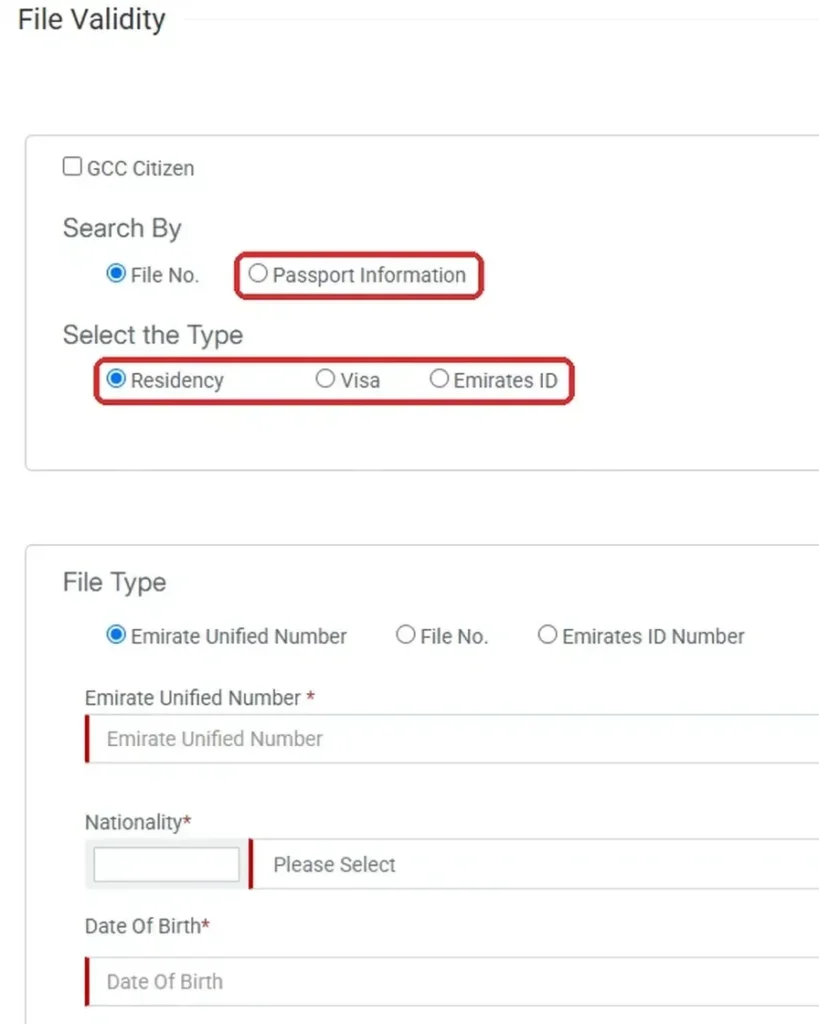
For all other emirates: Go to ICP Smart Services and click File Validity in the row of quick services under the top menu. Select the “Passport Information” option, choose “Residency,” and enter your passport number and expiry date. This shows whether your residence visa and the linked Emirates ID are valid, along with their expiry dates.
Either way, here is the limit to understand: neither portal shows the live application stage of a new card. A passport check only confirms your visa and ID are active in the database, it will not tell you whether a new card is under process, printed, or dispatched. For that live tracking, you need your PRAN (for a new card) or your Emirates ID number (for a renewal or replacement) on the ICP ID Card Status page.
How to Check Emirates ID Status by Application Number
If you have recently applied for a new Emirates ID, you can check the application status using your PRAN or application number.
Follow these steps:
Open the official ICP ID Card Status page.
Enter your PRAN or application number.
Complete the CAPTCHA.
Submit the form.
Your current Emirates ID application status will appear on the screen.
For new Emirates ID applications, the PRAN/application number is used to track the application. For renewal or replacement applications, use your Emirates ID number instead.
If you cannot find your PRAN, check your application receipt, confirmation SMS or email, or contact the typing centre that submitted your application.
Other Ways to Do an Emirates ID Status Check Online
You can also access Emirates ID services through other official ICP channels.
UAEICP App
The official UAEICP app lets you access ICP services and view application-related information from your mobile phone.
ICP Smart Services
If you submitted your application through an ICP account, you can log in to ICP Smart Services and check your applications or requests.
SMS Notifications
ICP may also send application and delivery updates to the mobile number registered with your application.
For a quick manual status check, however, the official ICP ID Card Status page is the simplest option when you already have your PRAN or Emirates ID number.
What Is a PRAN, and Where Do You Find It?
PRAN is your application number, the key to tracking a new Emirates ID. You will find it in any of these places:
Printed on your application receipt
On the form from the typing centre
In the confirmation SMS or email from ICP
Inside your ICP Smart Services account
Lost your PRAN? Here is how to recover it:
Check your SMS or email. ICP usually sends your PRAN in the confirmation message when you submit your application, search your inbox or messages for “ICP” or “PRAN.”
Log in to ICP Smart Services. If you created an account when applying, your active and past applications appear on your dashboard with the PRAN listed against each one, no need to remember the number itself.
Use UAE Pass to log in to the UAEICP app. This pulls your linked applications automatically, which sidesteps the need for a PRAN entirely.
Ask the typing centre that filed your application. Typing centres keep a copy of your submission on file and can read out your PRAN over the phone or via WhatsApp.
Call ICP on 600 522222 as a last resort. Have your Emirates ID number (if you have an existing card) or your full name, passport number, and nationality ready so they can locate your file.
For a renewal or replacement, you can skip the PRAN search entirely and simply use your Emirates ID number instead, it is only new applicants who strictly need to track down a PRAN.
What If Emirates ID Status Shows “No Record Found”?
If the ICP status checker shows “No Record Found,” don’t immediately assume that your Emirates ID application has been cancelled.
First, make sure you are using the correct number for your application type:
New application: Use your PRAN or application number.
Renewal: Use your Emirates ID number.
Replacement: Use your Emirates ID number.
If the number is correct but your application still does not appear:
Check your application receipt or confirmation message.
Verify the number with the typing centre that submitted your application.
Try checking your application through ICP Smart Services.
Contact ICP on 600 522222 if the problem continues.
A “No Record Found” result can simply mean that the wrong number was entered or the application is not appearing through that particular search method.
Emirates ID Status Meanings: What Each One Means and What to Do
When you track your Emirates ID, you will see one of these stages. Here is what each means and your next step:
Status
What it means
What to do
Application received
ICP has your application in the queue
Nothing yet, check again later
Under process
ICP is reviewing your documents and biometrics
Normal. If it stays here well beyond ICP’s stated processing time, call 600 522222
Approved
Your application is approved, ready to print
Wait for printing
Card printing / printed
Your card is being printed
Dispatch comes next
Dispatched
Your card has been handed to the courier
Watch for the SMS with a tracking number
Ready for collection
Your card is waiting at a branch or centre
Collect it with valid ID
Delivered
Your card has arrived or been collected
Check the details on it are correct
Returned for modification
There is an error or missing detail
Contact ICP or your typing centre to fix and resubmit
How Long Does an Emirates ID Take?
The processing time depends on the type of Emirates ID application and whether all required steps have been completed.
For the New Identity Card Issuance service, ICP currently lists a 5-day service completion duration. This does not necessarily mean the entire journey from residency application to physical delivery will take exactly five days.
Once the application is approved, the card moves through printing and dispatch before being delivered or made available for collection.
If your application has remained unchanged for an unusually long time, check your status again through ICP Smart Services or contact ICP on 600 522222.
Emirates ID Delivery Tracking: From Dispatch to Your Door
Once your Emirates ID status changes to Dispatched, the application has moved from ICP processing to physical delivery.
ICP tracking and courier tracking are different:
ICP tracking shows application progress, such as approved, printed and dispatched.
Courier tracking shows the physical delivery progress.
You will normally receive an SMS with the relevant tracking or reference number when your card is handed over for delivery.
If you are unsure which courier is handling your card, check the dispatch SMS first rather than assuming it based only on your emirate.
For detailed courier-specific instructions, see our Emirates ID delivery tracking guide.
Your Digital Emirates ID: Use It Before the Card Arrives
If you need your Emirates ID while waiting for the physical card, check the official UAEICP and UAE Pass apps for your digital identity documents.
Digital identity services can help you access many UAE government and private-sector services without waiting for the physical card.
However, acceptance can vary by service, so check the specific service provider if you are unsure whether a digital ID will be accepted.
Check Your Emirates ID Validity, Expiry, and Renewal Fines
Your Emirates ID validity is tied to your residence visa, so renewing one usually means renewing the other. Our UAE residence visa renewal guide covers that side. To check your expiry date, use the File Validity tool on ICP Smart Services, or read the date printed on the card.
Renew on time. ICP charges a late renewal fine of AED 20 per day after a 30-day grace period, capped at a maximum of AED 1,000. Checking your status regularly is the easiest way to avoid that fine. If you already have an outstanding fine, our Emirates ID fine check guide covers how to check the exact amount and pay it online.
Example: say your Emirates ID expired on 1 March. The 30-day grace period runs to 31 March, so renewing on 20 April means 20 days of fines, or AED 400. Leave it past about 20 May and the fine reaches the AED 1,000 cap, which still has to be paid when you renew.
How to Check Emirates ID Renewal Status Online?
If you have renewed your Emirates ID and want to check whether your new card is approved, printed, or ready for delivery, you can track your renewal status through the official ICP ID Card Status service.
Follow these steps:
Visit the official ICP Emirates ID status tracking page.
Enter your PRAN (application number) or your 15-digit Emirates ID number.
Complete the CAPTCHA verification.
Click submit to view your current renewal status.
For a renewal application, use your Emirates ID number on the official ICP ID Card Status page. For a new Emirates ID application, use your PRAN or application number instead.
If your renewal status does not appear or does not show the latest update, check your application through ICP Smart Services or contact ICP on 600 522222.
Your renewal status may show:
Under Process: Your application is being reviewed.
Approved: Your renewal has been accepted and is moving forward.
Card Printing: Your new Emirates ID is being prepared.
Dispatched: Your card has been sent for delivery.
Ready for Collection: Your card is available for pickup.
If your Emirates ID renewal status remains unchanged for an extended period, contact ICP customer support at 600 522222 for assistance.
New Application vs Renewal vs Replacement: Which Number to Use
A quick rule, since this trips people up:
New application: track with your PRAN.
Renewal: track with your Emirates ID number.
Replacement (lost or damaged card): track with your Emirates ID number.
Replacing a Lost or Damaged Emirates ID: What It Actually Costs
If your Emirates ID is lost or damaged, you can apply for a replacement through the official ICP channels.
The current ICP service information lists:
Replacement ID card fee: AED 300
Smart Service fee: AED 100
Urgent service: AED 150 additional fee where applicable
The replacement card keeps the same validity period as the original card.
Because government fees and service charges can change, check the official ICP service page before making payment.
Status Stuck or “Returned for Modification”? How to Fix It
Two situations need action.
Stuck on “Under process”. If nothing changes well beyond ICP’s stated processing time, call the ICP helpline on 600 522222, or visit a Customer Happiness Centre. Have your PRAN or Emirates ID number ready.
“Returned for modification”. This means ICP found an error or a missing detail, often a document or a biometric issue. Your card will not print until it is fixed. Contact ICP or the typing centre that filed your application, correct the details, and resubmit.
Emirates ID Status vs Visa Status: What’s the Difference?
Your Emirates ID status and UAE visa status are related, but they are not the same thing.
Emirates ID status shows the progress of your identity card application, such as whether it is under process, approved, printed or dispatched.
Visa or residency status shows whether your residence permit is valid and provides information such as its validity period.
If you want to track an Emirates ID application, use the official ICP ID Card Status service with your PRAN or Emirates ID number.
If you want to check your UAE residence visa instead, use the relevant ICP or GDRFA Dubai service depending on where your visa was issued. If your visa has been cancelled, our UAE visa grace period check guide shows how long you can stay.
Checking the Status for Family or Sponsored Members
You can track the Emirates ID of family members you sponsor, such as a spouse or child. Use that person’s PRAN or Emirates ID number on the ICP page, exactly as you would for your own. The application data belongs to them, so keep their numbers handy.
A clear warning. Only the ICP website (icp.gov.ae), the UAEICP app, and ICP Smart Services can show your real Emirates ID status. Many third-party sites copy the look of an official tracker to collect your details. Never enter your Emirates ID or passport number on an unofficial “check” site. If a page is not on icp.gov.ae, it cannot see your status.
Conclusion
An Emirates ID status check online takes under a minute, and it is the simplest way to stay ahead of delays and renewal fines. Use your PRAN for a new card and your Emirates ID number for a renewal or replacement, and check on the official ICP site, app, or Smart Services only.
If your status stalls well beyond ICP’s stated processing time or shows “returned for modification”, do not wait, call ICP on 600 522222 and fix it. And check the UAEICP or UAE Pass app for your digital Emirates ID, which many services accept while the card is on its way.
Frequently Asked Questions
How do I check my Emirates ID status online?
Open the ICP ID Card Status page, enter your PRAN (for a new card) or your Emirates ID number (for a renewal or replacement), type the CAPTCHA, and submit. Your status appears instantly.
How can I check my Emirates ID status with my passport number?
Use the File Validity tool on ICP Smart Services. Your passport shows whether your residence visa and linked Emirates ID are valid, but not the live application stage. To track a card that is being processed, use your PRAN or Emirates ID number on the ICP ID Card Status page.
How do I track Emirates ID online?
Here is how to track Emirates ID status: open the ICP ID Card Status page, enter your PRAN or Emirates ID number, and submit. You can also track Emirates ID applications in the UAEICP app or through the SMS updates ICP sends.
What does “under process” mean on my Emirates ID status?
It means ICP is still reviewing your application and biometrics. This is normal. If it stays unchanged well beyond ICP’s stated processing time, call ICP on 600 522222.
How long does it take to get an Emirates ID?
ICP lists a 5-day service completion time for issuing a new identity card. That covers ICP’s processing, not necessarily the whole journey, since the card still needs printing and delivery after approval.
What is a PRAN number?
PRAN is your application number for a new Emirates ID. You will find it on your application receipt, the typing-centre form, or the SMS or email from ICP.
Can I track my Emirates ID without the application number?
Yes. For a renewal or replacement, use your Emirates ID number. To check validity by passport, use the File Validity tool on ICP Smart Services.
What is the Emirates ID late renewal fine?
ICP charges AED 20 per day after a 30-day grace period, up to a maximum of AED 1,000.
What is the ICP helpline number?
Call ICP on 600 522222 for help with your Emirates ID status, delays, or a “returned for modification” result.
Can I use my Emirates ID before the card arrives?
Often, yes. Check the UAEICP and UAE Pass apps for your digital Emirates ID. Many services accept it, but acceptance varies, so confirm with the service provider if you are unsure.
Why does my Emirates ID status say “No Record Found”?
Check that you entered the correct PRAN/application number for a new application or your Emirates ID number for a renewal or replacement. If the details are correct and the application still does not appear, check ICP Smart Services or contact ICP on 600 522222.
Can I check my Emirates ID status with my application number?
Yes. For a new Emirates ID application, ICP allows you to check the application status using your PRAN/application number. For renewal or replacement applications, use your Emirates ID number.
Can I check my Emirates ID status without a PRAN?
Yes, depending on your application type. Renewal and replacement applications can be checked using the Emirates ID number. New applications generally require the PRAN/application number for the public ID Card Status checker.
Anees is a UAE-based content creator, writer, and SEO professional with over 12 years of experience. Since 2014, he has published research-backed guides on UAE visas, labour laws, jobs, traffic fines, and government services, all verified against official sources. He is certified in SEO by HubSpot Academy and Digital Marketing by Google Digital Garage.
12+ Years ExperienceHubSpot Academy — SEOGoogle Digital Garage
Disclaimer: This information is for general guidance only, based on publicly available UAE laws and regulations. It does not constitute legal advice. Always verify with official UAE government sources or a qualified legal professional.



Your email will not be published. Comments are reviewed before appearing.