Got a fine you know is wrong? You can fight it. Knowing how to dispute a traffic fine in UAE comes down to one thing: send your objection to the authority that issued the fine, with proof. Most channels are free and online, and they work with UAE Pass.
The tricky part is that each emirate, and each type of fine, has its own route. A Dubai Police speeding fine, an RTA parking ticket and a Salik toll fine all go to different places. This guide walks through every route, deadline and document, so you file once and file right.
Quick answer: To dispute a traffic fine in the UAE, first check which authority issued it. Then file an objection on that authority’s app or website with your fine number, plate details and evidence. Dubai Police fines go through the Dubai Police app. Most other emirates use the MOI UAE app or their own police app. If your objection is rejected, you can escalate to Traffic Prosecution.
Key facts at a glance
Many official objection channels are free, but fees can vary by authority and fine type.
Deadlines differ. Dubai public parking fines allow 30 days. Salik fines allow up to 13 months.
Some authorities need the fine unpaid. Others refund you if your dispute succeeds.
Evidence decides most cases. A clear photo or dashcam clip beats a long explanation.
A rejected objection is not the end. You can take it to Traffic Prosecution and, in some cases, to Traffic Court.
Can You Dispute a Traffic Fine in the UAE?
Yes. Every emirate lets drivers object to a fine they believe was issued by mistake. Traffic rules come from Federal Decree Law No. 14 of 2024 on Traffic Regulation, which took effect on 29 March 2025. The fines and black points come from Ministerial Resolution No. 178 of 2017.
A dispute has one job. It cancels a fine that should never have been issued. It does not lower a fine that is correct.
So before you start, ask yourself which of these fits your case:
Your situation
Best option
The fine is wrong (wrong plate, wrong car, system error)
Dispute it
The fine is right but too big to pay at once
Discount or instalments
The fine is right and you are in Abu Dhabi
Court referral for a reduction (ADJD)
The last two options are covered later in this guide. The rest of this page focuses on disputing a fine that is genuinely wrong.
Who Issued Your Fine? Check This First
This is the step most drivers skip, and it is the main reason objections get bounced. You must dispute a traffic fine in the UAE with the authority that issued it. Sending it anywhere else wastes days.
Abu Dhabi Police app or website, TAMM, service centre
Within 1 month of the SMS
Free
Abu Dhabi parking (Mawaqif), Darb toll, buses
AD Mobility
Darb app Requests, TAMM, call centre 800850
Act fast
Free
Abu Dhabi municipal violations
Department of Municipalities and Transport
TAMM
Within 1 week
Free
Sharjah traffic fines
Sharjah Police
MOI UAE app, Sharjah Police, police station
Act fast
Free
Ajman traffic fines
Ajman Police
Ajman Police app or website
Act fast
Free
RAK and Umm Al Quwain
RAK Police, UAQ Police
MOI UAE app or website
Act fast
Free
Fujairah traffic fines
Fujairah Police
Traffic and Licensing Service Center, Al Hail
Act fast
Free
“Act fast” means no fixed window was published by that authority at the time of writing. Do not wait. Late objections are harder to win, and some discounts run out while you sit on a fine.
Valid Reasons to Dispute a Traffic Fine
Authorities cancel fines when the record is wrong, not when the driver feels unlucky. Your reason needs to point to a clear error you can prove.
Reasons That Usually Succeed
Wrong or misread plate. The camera picked up a similar plate, or your plate was cloned.
You no longer owned the car. The fine is dated after you sold or transferred the vehicle.
Radar or camera error. The radar caught a car in another lane, or the image shows a different vehicle.
Duplicate fine. The same violation appears twice.
Parking was paid. Your payment went through, but the system did not record it.
Faulty meter or missing signs. The parking machine was broken, or a sign was hidden or absent.
Real emergency. You were rushing a patient to hospital and can prove the time.
Breakdown. Your car broke down and you had to stop in a restricted spot.
Reasons That Rarely Work
“I did not see the sign.”
“Everyone else was driving at that speed.”
“I was only slightly over the limit.”
“The fine is too expensive.”
The Ministry of Interior has said it reviews both the violation and the radar’s settings when drivers object to speeding fines. Each radar is set to suit its road. So a radar objection works best when you have proof of a real error, such as an image showing another car.
How to Dispute a Traffic Fine in UAE: 5 Simple Steps
The screens differ by emirate, but the process is the same everywhere. Follow these five steps and you cover the basics for any fine.
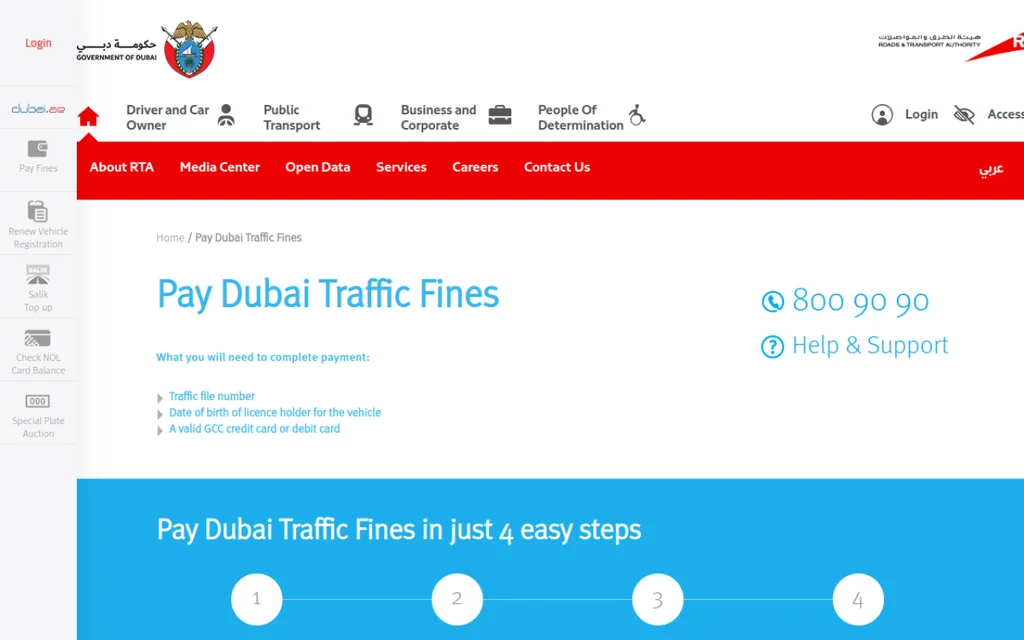
Screenshot: RTA Fines Inquiry and Payment page on the official rta.ae website (captured October 2026).
Check the fine details. Note the fine number, date, time, location and plate. Open the violation image if the app shows one.
Find the issuing authority. Use the table above. Dubai Police, RTA, Salik and Abu Dhabi Police each run their own objection service.
Collect your evidence. Match the proof to your reason. A sold car needs a transfer certificate. A parking fine needs a payment receipt.
File the objection. Log in with UAE Pass, pick the fine, write your reason in a few clear lines and attach your files.
Save the reference number. Track the status in the same app. Then decide to pay, wait or escalate.
Example: Sara gets a Dubai Police speeding fine dated three days after she sold her car. She downloads the ownership transfer certificate, opens the Dubai Police app, selects the fine and attaches the certificate. The fine belongs to the new owner, so her objection has strong proof from day one.
What Evidence Do You Need to Dispute a Traffic Fine?
Evidence is what turns a complaint into a cancelled fine. Officers review facts, not feelings. Keep your files ready before you open the app.
Basic Documents Checklist
Emirates ID (visitors use their passport)
Driving licence
Vehicle registration card (Mulkiya)
Fine number and fine date
Plate number, plate code and plate source
Traffic file number (TC number), if asked
Power of attorney, if someone files for you
Match Your Evidence to Your Reason
Your reason
Best proof
Car sold before the fine date
Ownership transfer certificate with the date
Wrong or cloned plate
Photo of your plate next to the fine image
Parking already paid
Payment receipt or app screenshot with time
Broken meter or hidden sign
Dated photos of the machine and the area
Medical emergency
Hospital record showing arrival time
Breakdown
Recovery truck or workshop receipt
Radar caught another car
The violation image plus dashcam footage
Can You Use Dashcam Footage?
Often, yes. Dashcam footage may support your objection if it clearly shows the event, but the authority decides whether to accept it. Make sure the clip:
Shows the date and time
Is clear and unedited
Covers the moment of the alleged violation
Careful: Submit footage only through the authority’s official channel. Do not post clips showing identifiable people or vehicles online, as this can break UAE privacy and cybercrime laws.
How to Write Your Objection
Keep it short and factual. Officers read many requests a day. Use this simple format:
I object to fine number [number] dated [date]. The vehicle was [sold on / parked with a valid ticket at / not at] [date, place]. I have attached [document]. Please cancel this fine.
Skip anger, long stories and blame. One clear reason plus one strong document works best. If you file with Dubai Public Prosecution, you must write in Arabic, as explained in the Dubai section below.
How to Dispute a Traffic Fine in Dubai
Dubai has the most routes, because three bodies issue fines: Dubai Police, the RTA and Salik. Pick the route that matches your fine.
Dubai Police Fines (Speeding, Red Light, Lanes, Phone Use)
Dubai Police handles moving violations caught by radars, cameras and officers. Dubai registered vehicles must object through Dubai Police, not the MOI app.
Online steps:
Open the Dubai Police app or website and sign in with UAE Pass.
Go to Traffic Services, then Fines Inquiry and Payment.
Choose the fine source (Dubai Police), then enter the ticket number and fine year.
Tap Fine Objection in the app, or Violation Review on the website.
Write your reason, attach evidence and submit.
You can also file in person at any Dubai Police station or at the General Directorate of Traffic in Al Barsha. A small service fee may apply online, so check the amount on screen before you submit. Keep the fine unpaid while your objection is open. Paying is widely treated as accepting the violation, and the Dubai Public Prosecution route accepts unpaid fines only. If in doubt, call Dubai Police on 901 before paying.
RTA Fines (Vehicle Licensing, Public Transport and Other RTA Fines)
The RTA runs its own free Grievance Management System. According to the RTA service page, the steps are:
Log in on the RTA website with your RTA account or UAE Pass.
Go to Services in your dashboard and select Dispute.
Choose Apply for a Grievance Request and select the fine type.
Fill in the details, verify your mobile and email, and upload your documents.
Enter your reason and submit. You get a reference number straight away.
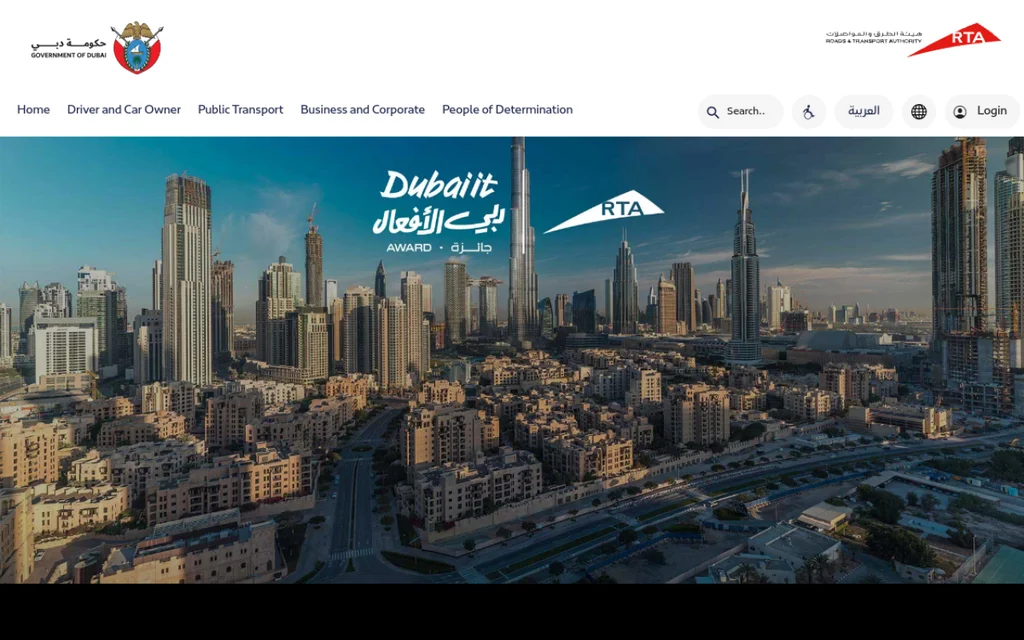
Screenshot: RTA homepage on the official rta.ae website (captured October 2026).
The RTA sends its decision by SMS within 30 working days. If you already paid and the RTA approves your dispute, you receive a refund within 7 days. You can track the case under Dispute, then Check Grievance Status. For general help, call RTA on 800 9090.
Dubai Parking Fines (Parkin)
Public parking fines in Dubai fall under the RTA and its operator Parkin. For eligible public parking fines, submit your dispute within 30 days of the fine date, and confirm the window on the RTA dispute form for your violation. You can file on that form, in the Parkin app (Services, then Dispute Parking Fines) or at an RTA customer centre.
Our full guide to Dubai parking fines covers fine amounts, grace periods and the dispute steps in detail.
Salik Toll Fines
Salik gives you the longest window of any fine in the UAE. You can dispute for up to 13 months from the date the fine was posted, or until your registration renewal, whichever comes first. You can dispute even after paying.
Use the Objections tab on the Salik violations page, the Salik app or the call centre. Salik usually finishes its review within 15 days. See our guide on how to check and dispute Salik fines in Dubai for the fine types and grace periods.
Mall and Private Parking Tickets
A ticket from a mall or private car park is not a government fine. Dubai Police and the RTA cannot cancel it. Contact the operator that issued it directly.
Need to check a Dubai fine before you dispute it? Our Dubai RTA fine check online guide shows every search method.
How to Dispute a Traffic Fine in Abu Dhabi
Abu Dhabi splits fines between Abu Dhabi Police, AD Mobility and the municipality. Each one has a different route, so check the issuer on your fine first.
Abu Dhabi Police Fines (Moving Violations)
Abu Dhabi Police sends an SMS for each violation to the phone on the car’s traffic file. Abu Dhabi Police has said owners can object within one month of that SMS, and that an owner who does not object is treated as accepting the violation. Confirm the current window in the app when you file.
You can object when:
The fine was issued by mistake
Another person was driving the car at the time
File through the Abu Dhabi Police app or website with UAE Pass, through TAMM, or at an Abu Dhabi Police customer service centre. Add your fine number, plate details, your reason and photos. Police may call you for more details before deciding.
AD Mobility Fines (Mawaqif Parking, Darb Toll and Buses)
AD Mobility, formerly the Integrated Transport Centre (ITC), issues parking, toll and public transport fines. You have three ways to object:
Darb app: open Requests, which covers grievances for Darb toll fines and Mawaqif parking fines
TAMM: use the Request a Grievance for Transport Violations service
Phone or in person: call 800850 or visit a customer happiness office at a bus station
Keep your Emirates ID and contact number ready. Visit AD Mobility for the current service list.
Abu Dhabi Municipal Violations
Municipal fines follow a much tighter clock. You must object on TAMM within one week of receiving the citation. The appeal is free, but you can file only once per unpaid violation, and you must show proof that you fixed the cause.
Transfer Your Fine to Court for Review (ADJD)
Abu Dhabi offers one extra option. The Abu Dhabi Judicial Department lists a service to transfer traffic violations to court. You ask the Public Prosecution to send the violation to court, where it can be reviewed for objection or a possible reduction.
Go to adjd.gov.ae and open Prosecution services.
Choose Request to transfer traffic violations to court.
Select Abu Dhabi Police or ITC, based on who issued your fine.
Submit with UAE Pass and attach your violation report.
Pay the final amount through the link you receive by SMS.
A transfer request does not guarantee a lower fine. The court decides the final amount, and timings can vary. Read the current service terms on the ADJD website before you apply. For the full list of Abu Dhabi fine amounts and black points, see our Abu Dhabi traffic fines list.
How to Dispute a Traffic Fine in Sharjah
Sharjah fines can come from three places: Sharjah Police, the Sharjah Roads and Transport Authority (SRTA) and Sharjah Municipality. Most driving fines come from Sharjah Police.
Sharjah Police Fines
Sharjah Police fines sit in the federal system, so you can object through the MOI UAE app or the MOI website. You can also visit a Sharjah Police station or service centre in person.
Open the MOI UAE app and log in with UAE Pass.
Find the fine on your traffic file.
Submit an objection with your reason and evidence.
Track the status in the app.
The Sharjah Police website lists its current contact channels for traffic enquiries. File quickly, as Sharjah also runs a 35% discount for fines paid within 60 days.
SRTA and Sharjah Municipality Fines
SRTA handles violations tied to taxis, buses and transport licences. Object through the SRTA online services.
Sharjah Municipality issues paid parking and municipal fines. Object through the municipality’s own portal.
If Sharjah Police Rejects Your Objection
You can apply to the Traffic Prosecution in Sharjah. It can refer your case to the Sharjah Traffic Court, which can review the camera record.
How to Dispute a Traffic Fine in Ajman, RAK, Umm Al Quwain and Fujairah
The northern emirates rely mostly on federal and police apps. The process is short, and most of it happens on your phone.
Ajman
Ajman Police runs an official Objection to Traffic Fines service, listed in the Ajman government service catalogue. It takes about five minutes.
Log in with UAE Pass on the Ajman Police website or app.
Submit the application and attach your documents.
Add your reason and a copy of the violation.
Receive an SMS with your application number.
Ras Al Khaimah and Umm Al Quwain
Use the MOI UAE app or the MOI website. Log in with UAE Pass, open your traffic fines, choose the fine and submit your objection with evidence. You can also visit an MOI service centre in person.
The Ministry reviews the violation and, for speeding fines, the radar settings before it decides. The same channel covers fines linked to other GCC countries for vehicles registered in the federal system.
Fujairah
Fujairah Police offers a free service called Objection to a traffic violation and referring it to traffic prosecution. You submit it at the Traffic and Licensing Service Center in Al Hail, and it takes about 30 minutes.
Bring your Emirates ID, driving licence and the fine details.
Bring photos, dashcam footage or other proof.
Fujairah Police refers your objection to the traffic prosecution, which decides on the fine.
For opening hours, phone numbers and the full Fujairah fines list, read our Fujairah traffic fine check guide.
Should You Pay a Traffic Fine Before Disputing It?
It depends on who issued it. Some authorities treat payment as accepting the fine. Others review paid fines and refund you if you win. Before paying, check whether the issuing authority allows objections after payment, because rules can differ by fine type and service.
Safer to keep unpaid
Disputes allowed after paying
Dubai Police (payment is widely treated as acceptance)
RTA (refund within 7 days if approved, per the RTA service page)
Abu Dhabi municipal violations (one appeal per unpaid violation)
The safe rule: if you plan to dispute a traffic fine in the UAE, file first and pay later. Pay only after a rejection, or if the authority clearly offers refunds.
What About the 35% Discount?
Abu Dhabi and Sharjah give 35% off eligible fines paid within 60 days of the violation, and 25% off after 60 days up to one year, under the Sharjah Executive Council decision and Abu Dhabi Police’s own scheme. Serious violations are excluded. An open objection may not pause that clock, so file early. If your objection fails close to day 60, you may still pay at the higher discount.
Our guide to the UAE traffic fine discount explains which emirates offer discounts right now and how the 60 day window works.
What Happens After You Dispute a Traffic Fine?
You get a reference number as soon as you submit. Keep it safe. The authority then reviews your file and sends its decision, usually by SMS or in the app.
How Long Does a Decision Take?
Authority
Typical review time
RTA
Up to 30 working days
Salik
Up to 15 days
Dubai Public Prosecution
About 10 working days
Fujairah Police (filing)
About 30 minutes at the centre, then prosecution review
Others
Varies; track the status in the app
If Your Objection Is Approved
The fine is cancelled on the issuer’s system.
If the violation is cancelled, check your traffic file to confirm the linked black points were removed too.
If you paid first, RTA and Salik refund the amount.
If Your Objection Is Rejected
You have three choices:
Pay the fine. This keeps your record clean for vehicle registration renewal.
Submit new evidence. Salik, for example, accepts a written dispute again by email if you have extra proof.
Escalate to Traffic Prosecution. This moves your case from customer service into a formal legal review.
How to Escalate to Dubai Public Prosecution
If Dubai Police rejects your objection, you can file a Request to Object a Traffic Fine on the Dubai Public Prosecution website. It is free.
Before you start, make sure:
The fine is still unpaid
You can confirm the fine is not under review with another authority (the form asks this, so check with Dubai Police on 901 if your first objection is still open)
You can write your explanation in Arabic (English entries are rejected automatically)
You will need: Emirates ID or passport, driving licence, Mulkiya, fine number and date, a copy of the violation notice, your evidence, and a power of attorney if someone files for you.
Traffic Prosecution reviews the request in about 10 working days. If it accepts, you must attend Traffic Court on the date given.
In other emirates, the route is similar. Abu Dhabi drivers can use the ADJD court transfer service. Sharjah and Fujairah objections go to their traffic prosecution offices.
Do You Need a Lawyer?
For a single camera or parking fine, usually not. The online forms are simple. A lawyer or legal translator can help when:
Your case goes to Traffic Prosecution and needs a formal Arabic memo
You face a licence suspension at 24 black points
Your car was impounded
The case involves an accident with injuries or driving under the influence
Dispute, Reduce, Discount or Pay in Instalments?
Disputing is only one way to deal with a fine. Pick the option that fits your situation, not the one that feels best.
Situation
Best move
Where
The fine is wrong
Dispute it
Issuing authority (see table above)
The fine is right, paid early
Take the discount
Abu Dhabi and Sharjah: 35% within 60 days, 25% up to one year (exclusions apply)
Unpaid fines block your vehicle registration renewal. Do not leave a correct fine sitting while you hope for a campaign.
Special Situations: Rental Cars, Sold Cars, Company Cars and GCC Fines
Some fines do not fit the standard path. Here is how to handle the common ones.
Rental Cars and Tourists
Rental fines are issued against the car’s plate, so the rental company sees them first. It usually charges your card, often with an admin fee.
Ask the rental company for the fine number, date and location.
Check the fine yourself on the issuer’s website by plate number.
Ask the company for a letter or no objection certificate if the issuer needs one.
Visitors file with passport details instead of an Emirates ID.
Most channels work online, so you can object after you leave the UAE.
A Fine on a Car You Already Sold
This is one of the strongest reasons to dispute. Download the ownership transfer certificate showing the date. Attach it to your objection and point out that the fine date comes after the transfer.
Company and Fleet Vehicles
The company owns the traffic file, so the company files the objection. If an employee files, they need an authorisation letter or power of attorney. Keep a driver log, so you can show who had the car at the time.
GCC Cars and Fines From Other GCC Countries
The MOI objection service also covers fines linked to other GCC countries for vehicles in the federal system. Dubai registered vehicles still go through Dubai Police.
Fines You Cannot Pay or Dispute Online
Serious offences, such as driving under the influence or reckless driving, often go straight to prosecution or court. These need an in person visit, and legal help is wise.
Common Mistakes That Get Objections Rejected
Most failed objections fail for simple reasons. Avoid these and your chances go up straight away.
Filing with the wrong authority. A Salik fine sent to Dubai Police goes nowhere.
Leaving out the fine number. Without it, many systems send the request back.
No evidence. A story without proof rarely wins.
Writing in English to Dubai Public Prosecution. It accepts Arabic only.
Paying first where payment counts as acceptance. This can end your right to object.
Filing the same fine in two places. Pick one channel and follow it through.
Missing the deadline. Abu Dhabi municipal fines give you just one week.
Emotional wording. Stick to dates, places and documents.
Paying an unofficial agent. Only the issuing authority can cancel a fine. No middleman can do it for a fee.
Latest Updates on Disputing Traffic Fines in the UAE
Last verified: October 2026. Facts are based on official government sources and their published announcements. Service terms change, so confirm details on the issuer’s portal before you file.
March 2025: Federal Decree Law No. 14 of 2024 on Traffic Regulation came into force on 29 March 2025.
October 2024: The Abu Dhabi Judicial Department launched its round the clock service to transfer traffic violations to court for objection or reduction.
2025: Abu Dhabi allowed municipal violation appeals on TAMM within one week of the citation.
August 2025: The Ministry of Interior explained that it reviews both the violation and the radar settings when drivers object, and that its service covers GCC linked fines.
We review this guide every quarter and after any major traffic announcement.
Conclusion: Dispute the Right Way, the First Time
Disputing a traffic fine in the UAE is simple once you know the rule: find the issuer, file with proof, and do it fast. Most wrong fines get cancelled because the driver picked the right channel and attached one strong document.
Keep these points in mind:
Dubai Police, RTA, Salik, Abu Dhabi Police and AD Mobility each have their own route.
Deadlines range from one week to 13 months, so check yours today.
Keep Dubai Police fines unpaid while you object. RTA and Salik can refund paid fines if your dispute succeeds.
A rejection is not final. Traffic Prosecution and, in Abu Dhabi, the ADJD court service give you a second look.
If the fine is correct, use the discount or instalments instead of disputing.
Check your fines often, so you catch a wrong one while your window is still open. For more guides on checking, paying and reducing fines, visit our Fines and Violations section.
Disclaimer: This guide is for general information only and is not legal advice. Always confirm the latest process with the authority that issued your fine.
Frequently Asked Questions
How do I dispute a traffic fine in UAE online?
Find the authority that issued the fine, then log in to its app or website with UAE Pass. Dubai Police fines go through the Dubai Police app. RTA fines go through the RTA Grievance Management System. Sharjah, RAK and Umm Al Quwain fines go through the MOI UAE app. Attach your evidence and save the reference number.
Can I dispute a traffic fine after paying it?
It depends on the issuer. RTA and Salik review paid fines and refund you if you win. Dubai Public Prosecution accepts unpaid fines only, and paying a Dubai Police fine is widely treated as accepting it. Check the issuer’s rules, then file first and pay later.
How long do I have to dispute a traffic fine in the UAE?
There is no single deadline. Dubai parking fines allow 30 days. Salik allows up to 13 months. Abu Dhabi Police allows one month from the SMS. Abu Dhabi municipal fines allow one week. Others have no published window, so file as soon as you can.
Is there a fee to dispute a traffic fine?
Many channels are free, including the RTA grievance service, Salik, Dubai Public Prosecution, Fujairah Police and TAMM municipal appeals. Fees can vary by fine type, so check the service page first. Dubai Police may show a small service fee when you file online, so check the amount before you submit.
What happens if my traffic fine objection is rejected?
The fine stays on your record. You can pay it, send new evidence where allowed, or escalate to Traffic Prosecution. In Dubai, you file a Request to Object a Traffic Fine on the Dubai Public Prosecution website, written in Arabic.
Can tourists dispute a traffic fine in Dubai?
Yes. Visitors use passport details instead of an Emirates ID. For rental cars, ask the rental company for the fine number and any letter the issuer needs. Most dispute channels work online, even from outside the UAE.
Does a successful dispute remove black points?
If the authority cancels the violation, check your traffic file to confirm the linked black points were removed too. Paying a fine, on the other hand, never removes black points.
Can I dispute a fine on a car I already sold?
Yes, and it is one of the easiest disputes to win. Attach the ownership transfer certificate and show that the fine date comes after the sale date.
Can someone else dispute a traffic fine for me?
Yes, with a power of attorney. Companies can let an employee file with an authorisation letter.
Can I dispute a Salik or parking fine through Dubai Police?
No. Salik fines go to Salik. Public parking fines go to the RTA or Parkin. Dubai Police handles moving violations such as speeding and red light fines.
How long does a decision take?
The RTA replies within 30 working days. Salik usually takes up to 15 days. Dubai Public Prosecution takes about 10 working days. Other authorities vary, so track your reference number in the app.
Can I dispute a speeding fine if I think the radar was wrong?
Yes. The Ministry of Interior checks both the violation and the radar settings. Your objection is strongest when the violation image or your dashcam shows a different car or lane.
Anees is a UAE-based content creator, writer, and SEO professional with over 12 years of experience. Since 2014, he has published research-backed guides on UAE visas, labour laws, jobs, traffic fines, and government services, all verified against official sources. He is certified in SEO by HubSpot Academy and Digital Marketing by Google Digital Garage.
12+ Years ExperienceHubSpot Academy — SEOGoogle Digital Garage
Disclaimer: This information is for general guidance only, based on publicly available UAE laws and regulations. It does not constitute legal advice. Always verify with official UAE government sources or a qualified legal professional.



Your email will not be published. Comments are reviewed before appearing.