A salary card balance check UAE takes under a minute once you know which card you hold, because each provider uses its own portal, app or helpline. This guide covers Ratibi, C3Pay, LuLu Money and Al Ansari PayPlus cards, plus what to do when the balance does not match your salary.
Every number and step below was checked on the provider’s own website in November 2026. Where an official page does not confirm a detail, this guide says so instead of guessing.
How Do You Do a Salary Card Balance Check in the UAE?
You check a UAE salary card balance through the issuer’s official channel: the Ratibi enquiry page for FAB cards, the C3Pay app or helpline for C3Pay cards, the LuLu Money app for LuLu cards, and the Al Ansari Exchange app for PayPlus cards. Your payslip or the name printed on the card tells you which one to use.
Most salary cards are payroll cards linked to the Wages Protection System (WPS), the system MOHRE uses to track salary payments. They are not full bank accounts, so your bank’s mobile app will not show them.
Which Salary Card Do You Have?
The brand printed on the front of your card decides where you check the balance. The table below matches each card to its official channel.
Card
Issuer
Official way to check
Ratibi
First Abu Dhabi Bank (FAB)
Ratibi balance enquiry page or FAB phone line
C3Pay
Edenred
C3Pay app, any ATM or 600 56 7772
LuLu Money Salary Card
LuLu Exchange
LuLu Money app or WPS helpline
PayPlus
Al Ansari Exchange
Al Ansari app, branch or call centre
If your card shows none of these names, ask your employer’s HR team which payroll provider they use. A salary paid into a normal bank account is checked in that bank’s own app instead.
Official Links and Numbers for Salary Card Balance Checks
These are the official pages and helplines used in this guide. Save the one that matches your card.
You check a Ratibi balance on the FAB Ratibi page by opening the Ratibi Prepaid Card Balance Enquiry button, which leads to the Prepaid Card Inquiry form. Ratibi is the FAB payroll card for employees who earn up to AED 5,000.
The Ratibi page shows the balance enquiry button under Existing Ratibi Card Holder. Source: bankfab.com
Scroll to Existing Ratibi Card Holder and tap Ratibi Prepaid Card Balance Enquiry.
Enter the card digits the form asks for.
Enter the Card ID printed on the lower left of your card.
Type the verification word shown in the picture and submit.
What Is the Card ID on a Ratibi Card?
The Card ID is the reference number printed on the lower left face of the prepaid card, and the enquiry form asks for it together with the last digits of the card number. The form shows a card diagram that marks both places in red.
The enquiry form asks for card digits and the Card ID from the lower left of the card. Source: ppc.magnati.com
Read the small instruction beside the card picture before you type. The field label and the guide text on this page are worded a little differently, so follow the number of digits the on screen guide shows for your card.
Which FAB Numbers Can You Call About a Ratibi Card?
FAB lists 600 52 2298 as the Ratibi service line inside the UAE and +971 2 499 6279 from outside the UAE. General FAB customer care is 600 52 5500 inside the UAE and +971 2 681 1511 from abroad.
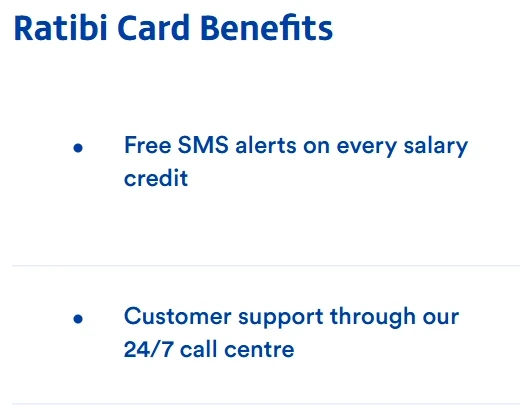
FAB also states that Ratibi cardholders get free SMS alerts on every salary credit, and that there is no minimum balance requirement or monthly charge for cardholders. The page does not list an ATM balance step, so use the enquiry page or the phone lines above.
FAB lists free SMS alerts and 24/7 call centre support as Ratibi benefits. Source: bankfab.com
How Do You Check a C3Pay Card Balance?
You check a C3Pay balance in the C3Pay app, at any ATM, or by calling 600 56 7772, according to Edenred’s FAQ. Edenred runs the C3Pay card and the payroll behind it.
Edenred states the three ways to check a C3Pay balance. Source: edenred.ae
How Do You Use the C3Pay App to See Your Balance?
The C3Pay app shows your available balance and transactions once your card is active. Employees download the app from the App Store or Google Play and scan their Emirates ID to activate the card.
Inside the app you can also view your ATM PIN under Profile, and block or unblock your card at any time. Edenred says the PIN cannot be changed, and each new card has its own PIN.
Does C3Pay Send SMS Alerts and What Do They Cost?
C3Pay SMS alerts are optional and are switched on in the app or through the helpline. Edenred lists two options.
Salary alerts: 0.50 per alert (the page does not name the currency)
Transaction alerts: AED 3 per month excluding VAT, and the package includes salary alerts
Edenred’s FAQ does not publish an SMS command for checking a balance. Several websites quote a short code for that, but it is not on Edenred’s own page, so this guide does not repeat it.
Who Can Help With a Lost C3Pay PIN or Card?
Edenred points employees to the app first. If the app is not available, the PIN help line is WhatsApp +971 588 762 762 or the call centre at 6005 67772. After security checks, the PIN is sent by SMS.
How Do You Check a LuLu Money Salary Card Balance?
You check a LuLu Money Salary Card through the LuLu Money app or the WPS helpline, because LuLu lists the app for transaction history, usage limits, PIN reset and card blocking or replacement. The LuLu page does not name a separate balance step. LuLu Exchange calls the card a digital WPS account.
LuLu publishes 600522204 as its WPS contact number and wpsinfo@luluexchange.com as the WPS email. The wage and salary page does not state a balance command or SMS code, so use the app or the helpline for a balance.
LuLu also lists cash withdrawal through all LuLu Exchange branches, Emirates NBD ATMs, Emirates Islamic Bank ATMs and Mashreq Bank ATMs, plus selected ATMs through the UAE Switch.
How Do You Check an Al Ansari PayPlus Card Balance?
You check a PayPlus balance for free on the Al Ansari Exchange app, at an Al Ansari branch, or through the call centre, according to Al Ansari’s own page. The page also says no minimum account balance is required.
Al Ansari describes a dedicated 24 hour call centre for card questions. The page does not print the phone number, so use the number on the back of your card or on the Al Ansari website.
How Do You Check Your Salary Balance in a Normal Bank Account?
You check a normal bank account balance in your bank’s mobile app, online banking, or at an ATM of that bank, and the bank’s own website or the number on your debit card shows the exact options. This applies when your employer pays your salary into a bank account instead of a payroll card.
Banks differ on SMS banking, so ask your bank before you rely on any short code you find online. If the salary has not appeared, the steps in the missing salary section below apply in the same way.
Why Is My Salary Card Balance Different From My Salary?
A salary card balance can differ from your salary because of timing, alert fees or spending you forgot. Check these three points in order.
Timing: Edenred says salaries are processed the same day only if the funds and the salary file reach Edenred Payroll before 4:30 pm. WPS cut off times are 10 am, 12 pm and 1 pm, and non WPS salaries are processed until 4 pm.
Alerts: a paid SMS package can reduce the balance slightly, as shown in the C3Pay fee list above.
Card use: tap payments, online purchases and ATM withdrawals appear in your transaction history in the provider’s app.
Open the transaction list first. It shows every credit and debit, which settles most balance questions in a minute.
What Should You Do If Your Salary Has Not Reached Your Card?
If your salary is missing from the card, first confirm the date, then ask your employer, and then complain to MOHRE if the wages are still unpaid. The UAE Government wage page says salaries for the previous month are due on the first day of each month and must be paid through WPS.
The UAE Government portal explains when wages are due under WPS. Source: u.ae
Check your balance and transaction history in the correct app or portal.
Ask HR for the WPS payment confirmation and the date it was sent.
Wait for the provider’s processing window, especially near the 4:30 pm cut off for C3Pay.
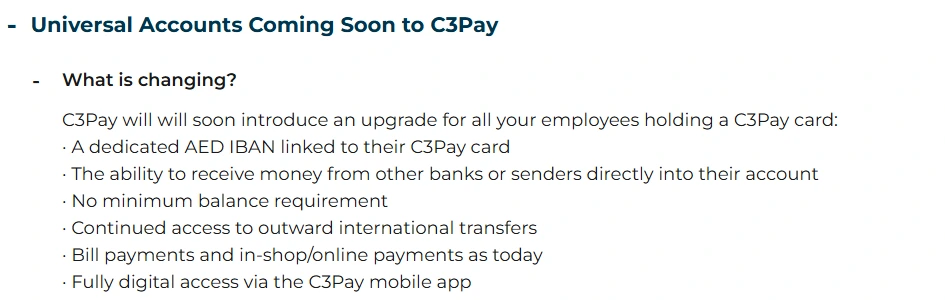
The C3Pay Universal Account is an upgrade that Edenred says will give C3Pay cardholders a dedicated AED IBAN linked to their card. Edenred’s FAQ says it will be ready by December 2026, in line with regulatory requirements.
Edenred lists the planned Universal Account features in its FAQ. Source: edenred.ae
Edenred lists these features for the new account.
A dedicated AED IBAN
The ability to receive money from other banks or senders
No minimum balance requirement
Continued outward international transfers
Bill payments and in store or online payments as today
Fully digital access through the C3Pay app
Edenred says no disruption is expected and the migration will be managed centrally. A new card will be issued only if it is needed for technical or regulatory reasons. Edenred UAE also states that it has received in principle approval from the Central Bank of the UAE for a Stored Value Facility licence.
Can You Check a Salary Card Balance at an ATM?
You can check a C3Pay balance at any ATM, according to Edenred. For Ratibi, LuLu and PayPlus cards, the official pages reviewed here do not describe an ATM balance step, so use the app, enquiry page or helpline listed above.
Use your own provider’s ATMs where possible. Non network ATMs may charge a fee, and the amount depends on the machine owner.
Common Mistakes When Checking a Salary Card Balance
Most failed checks come from small input errors or from using the wrong channel. Avoid these.
Using a bank app for a payroll card that is not a bank account
Entering the wrong digits of the card number on the Ratibi form
Confusing the Card ID with the card number
Sharing a PIN, card number or verification code with a caller or a message sender
Trusting unofficial websites that publish SMS shortcodes the provider never listed
If anyone asks for your PIN by phone or message, stop and contact the provider on the number printed on your card.
Latest Updates on Salary Card Balance Checks in the UAE
These are the dated changes that matter for UAE salary card holders.
November 2026: Edenred’s FAQ says C3Pay Universal Accounts will be ready by December 2026.
The UAE Government payment of wages page states that salaries are due on the first day of each month through WPS, and it references Ministerial Resolution No. 340 of 2026 on the Wage Protection System.
Conclusion
A salary card balance check is simple when you use the issuer’s own channel. Use the Ratibi enquiry page for FAB cards, the C3Pay app or 600 56 7772 for C3Pay, the LuLu Money app for LuLu cards, and the Al Ansari app for PayPlus cards.
If your salary is late, check the transaction list, ask HR for the WPS date, and then raise a MOHRE complaint. For wider salary rules, see our UAE Laws section, the UAE minimum wage law guide, and how to open a personal bank account if you want your salary paid into a bank.
Frequently Asked Questions
How do I do a salary card balance check UAE?
You check the balance through your card issuer’s official channel. Ratibi uses the FAB enquiry page, C3Pay uses its app or 600 56 7772, LuLu uses the LuLu Money app, and PayPlus uses the Al Ansari app. The brand on your card tells you which one applies.
How do I check my Ratibi card balance?
Open the FAB Ratibi page, choose Ratibi Prepaid Card Balance Enquiry, and fill in the card digits, Card ID and verification word. FAB also lists 600 52 2298 as the Ratibi service line inside the UAE.
How do I check my C3Pay balance?
Use the C3Pay app, any ATM, or call 600 56 7772, as listed in Edenred’s FAQ. You activate the card in the app with your Emirates ID before you can see your balance.
Can I check my salary card balance by SMS?
Only if your provider lists that service. Edenred offers optional SMS alerts for C3Pay, and FAB gives free SMS alerts on Ratibi salary credits, but neither official page publishes a balance command. Confirm with the helpline before you trust a code from a website.
How do I check my LuLu salary card balance?
Use the LuLu Money app or call the LuLu WPS number 600522204. LuLu lists transaction history, usage limits, PIN reset and card blocking inside the app, but its page does not name a balance step, so the helpline is the safe fallback.
Why has my salary not reached my salary card?
The salary may still be processing, or the employer may have paid late. Check the transaction list, ask HR for the WPS payment date, and file a MOHRE complaint if the wages stay unpaid.
Is it free to check a salary card balance?
It depends on the card. Al Ansari says balance enquiries are free on its app, at branches and through its call centre, and FAB says Ratibi has no monthly charges. Edenred lists charges only for optional SMS alerts, so check your provider’s fee page.
What is the C3Pay Universal Account?
It is a planned upgrade that gives C3Pay cardholders a dedicated AED IBAN and the ability to receive money from other banks. Edenred says it will be ready by December 2026.
Shoaib Afzal is a content writer and SEO specialist who has been writing since 2020. He has worked on multiple Dubai based projects and researches every guide on official UAE government websites before writing.
Writing Since 2020Dubai Based ProjectsOfficial Sources First
Reviewed by Anees, Founder and Editor of The UAE Times. He reads every article before it goes live. See our editorial policy.
Disclaimer: This information is for general guidance only, based on publicly available UAE laws and regulations. It does not constitute legal advice. Always verify with official UAE government sources or a qualified legal professional.







Your email will not be published. Comments are reviewed before appearing.