To download Ejari certificate copies in Dubai, you enter your Ejari contract number and your DEWA premise number or municipality number on the Dubai Land Department (DLD) website, or use the Dubai REST app. The certificate is the proof that your tenancy contract is registered, and you need it for services such as a DEWA account, visa processes and a mainland trade licence renewal.
This guide follows the official DLD service page and the DLD guide for the Dubai REST app, and it marks the points that come from property portals instead. For the registration fee and what a late registration blocks, see our Ejari violation fines guide, and for business topics browse our Businesses in UAE section.
How Do You Download an Ejari Certificate in Dubai?
You download an Ejari certificate in Dubai through the DLD website form or the Dubai REST app, using your Ejari contract number and either your DEWA premise number or your municipality number. A third route through UAE Pass is described by property portals, but check the steps inside the app before relying on it.
The sections below list what to have ready, the steps for each route and what to do if the system cannot find your contract.
What Do You Need Before You Download?
You need the Ejari contract number and one premises number, either the DEWA premise number or the municipality number, because the DLD form marks the contract number and the premises number as mandatory. The DLD page says the DEWA premise number must be a valid 9 digit number.
Both numbers appear on your tenancy documents. Property portals say the Ejari contract number sits at the top left of the Ejari document and the premises numbers sit under the leased unit details, so check your registration paperwork first. The DLD form also asks you to pass a captcha before the download starts.
How Do You Download the Ejari Certificate on the DLD Website?
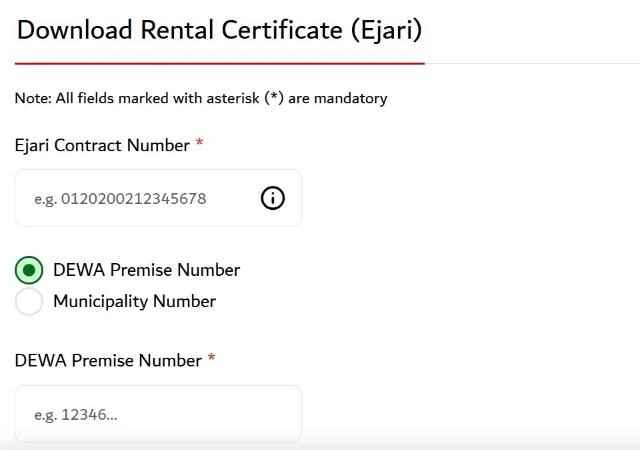
The DLD website has a Download Rental Certificate (Ejari) service that returns the certificate once the contract number and premises number match a registered contract.
Open the Download Rental Certificate (Ejari) service on the Dubai Land Department website.
Enter your Ejari contract number.
Choose DEWA Premise Number or Municipality Number and enter it.
Complete the captcha.
Select Download file to save the certificate.
The DLD Download Rental Certificate (Ejari) form asks for the contract number and a DEWA premise or municipality number. Source: dubailand.gov.ae
If the system shows that it could not find data for the details you entered, check each digit, because the service only returns a certificate for a registered contract. The DLD support line shown on the page is +971 8004488.
How Do You Download the Ejari Certificate on the Dubai REST App?
On the Dubai REST app, you open the app, choose Download Certificate, enter the contract number and the DEWA or municipality number, and download the certificate to your device. This is the sequence in the official DLD guide for the app.
The app suits tenants who want the certificate on a phone, for example to show a utility provider or an employer. Property portals add that you may need to create an account and log in first, so keep your login ready. If the app asks for a different menu name from the one in the DLD guide, follow the menu shown in your current app version.
Can You Get the Ejari Certificate Through UAE Pass?
Property portals describe a UAE Pass route in which you open Documents, add a document from the Dubai Land Department section and choose Tenancy Contract, after which a contract linked to your Emirates ID appears. This route is not described in the DLD guide used for this article, so treat it as a convenience and confirm it in the app.
Its advantage is that it does not ask for the Ejari or DEWA number, because the match is made on your Emirates ID. It works only when the registered contract is linked to your own Emirates ID.
Where Can You Find Your Ejari Number if You Lost It?
If you lost the Ejari certificate, you can usually find the number in the registration message you received, in the Dubai REST app, or by asking your landlord, agent or property management company. DLD support can also help with the details of the property.
The DEWA premise number is printed on your DEWA bill, which is often the quickest way to find it. Keep a PDF copy of the certificate once you download it, because several services ask for it again at renewal time.
What Should You Do If the Certificate Is Not Found?
A not found message almost always means that one of the numbers does not match the registered contract or that the contract was never registered. The table lists the usual causes and the fix.
Problem
Likely cause
What to do
Contract not found
A digit in the Ejari number is wrong
Re check the number on the registration paperwork
Premises number rejected
The DEWA number is not 9 digits or is the wrong unit
Use the number on your DEWA bill or the municipality number
No certificate exists
The landlord or agent did not complete registration
Ask them to register, or register it yourself
Portal will not load
Browser or session issue
Clear the cache, try another browser or use the app
If registration was never completed, follow the steps on the DLD register or renew tenancy contract page, which lists the Ejari fee at AED 177.75 online and AED 220 through a trustee centre.
Does Downloading the Ejari Certificate Cost Anything?
The DLD download service page does not list a fee for downloading the certificate, so the download itself appears to be free on the DLD website. The AED 177.75 and AED 220 amounts on the DLD site are registration fees, not download fees.
Be careful with third party websites that offer to fetch the certificate for a charge. The official form on the DLD website asks only for your contract details and a captcha.
What Do You Use the Ejari Certificate For?
The Ejari certificate is the proof of a registered tenancy that several services ask for. The usual uses are:
DEWA account: our Ejari violation fines guide explains that a missing Ejari blocks a DEWA connection.
Visa and sponsorship processes that need proof of a registered address.
Mainland business licence renewal, because the DET system needs a tenancy contract registered with RERA, as explained in our trade license renewal in Dubai guide.
Download the certificate once the registration is complete and store it with your lease, so you are not searching for the numbers when a deadline arrives.
Latest Updates (11 November 2026)
As of 11 November 2026, the DLD Download Rental Certificate (Ejari) service page asks for the Ejari contract number, a DEWA premise number or a municipality number, and a captcha. The DLD site shows that it was last updated on 3 November 2026.
If a tenancy disagreement cannot be settled, the rental dispute centre Dubai guide explains the documents, fees and appeal deadline.
Conclusion
Downloading an Ejari certificate takes a few minutes once you have the Ejari contract number and a premises number. Use the DLD website or the Dubai REST app, check every digit if the system cannot find your contract, and register the tenancy first if no certificate exists.
Download Ejari Certificate FAQs
How do I download an Ejari certificate in Dubai?
Open the Download Rental Certificate (Ejari) service on the DLD website, enter your Ejari contract number and your DEWA premise or municipality number, complete the captcha and select Download file. You can also use the Dubai REST app.
What details do I need to download the Ejari certificate?
You need the Ejari contract number and either the DEWA premise number or the municipality number. The DLD form marks these as mandatory and expects a valid 9 digit DEWA number.
Can I download the Ejari certificate on my phone?
Yes, the Dubai REST app lets you choose Download Certificate, enter the contract and premises numbers and save the certificate to your device.
Is there a fee to download the Ejari certificate?
The DLD download page does not list a fee. The AED 177.75 online and AED 220 trustee centre amounts are the registration fees for the tenancy contract.
What if the system says the Ejari certificate is not found?
Check each digit of the contract number and the premises number, and confirm that the landlord or agent completed the registration. If you still cannot find it, contact DLD support on +971 8004488.
Do I need an Ejari certificate to renew a trade licence?
Yes, for a mainland licence the tenancy contract must be registered with RERA, and the DET system says you cannot renew without it. Download the certificate to confirm the registration before you apply.
Shoaib Afzal is a content writer and SEO specialist who has been writing since 2020. He has worked on multiple Dubai based projects and researches every guide on official UAE government websites before writing.
Writing Since 2020Dubai Based ProjectsOfficial Sources First
Reviewed by Anees, Founder and Editor of The UAE Times. He reads every article before it goes live. See our editorial policy.
Disclaimer: This information is for general guidance only, based on publicly available UAE laws and regulations. It does not constitute legal advice. Always verify with official UAE government sources or a qualified legal professional.





Your email will not be published. Comments are reviewed before appearing.